
Join us at FabCon Atlanta from March 16 - 20, 2026, for the ultimate Fabric, Power BI, AI and SQL community-led event. Save $200 with code FABCOMM.
Register now!The Power BI Data Visualization World Championships is back! Get ahead of the game and start preparing now! Learn more
Hi all,
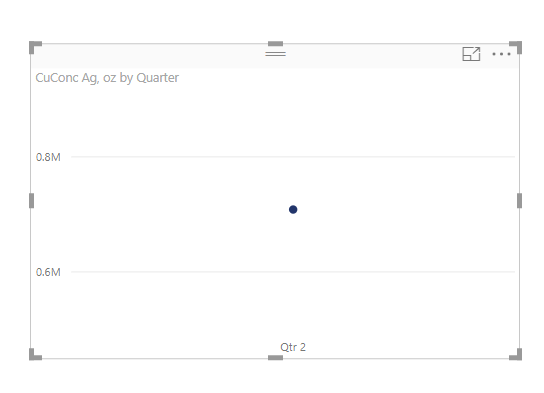
I want to show line instead of dot in line chart.
Is there way to achieve this?
Solved! Go to Solution.
With your Line Chart selected => Click the Format (Paint Brush) button
Go to Shapes => Turn On => Show Marker
Select the Marker shape you prefer from the drop down
For further customization => Turn On => Customize Series and go crazy ![]()
Customize shapes, size, color... like so...
Good Luck! ![]()
HI @GeorgiBarov
I wonder if you are using the built in calendar, which is only giving you one data point.
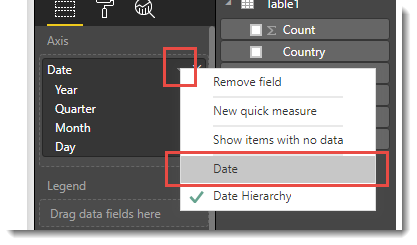
Try turning that off by clicking the small down arrow next to the X at the end of the top row and then choose [Date]
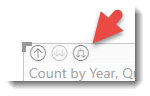
OTherwise click this button a few times to drill down to day. My preferred option is the above
Hi @Phil_Seamark,
Thank you for the reply, but I want to show the line only for one period instead of dot
So a horizontal line?
With your Line Chart selected => Click the Format (Paint Brush) button
Go to Shapes => Turn On => Show Marker
Select the Marker shape you prefer from the drop down
For further customization => Turn On => Customize Series and go crazy ![]()
Customize shapes, size, color... like so...
Good Luck! ![]()
The Power BI Data Visualization World Championships is back! Get ahead of the game and start preparing now!
Check out the November 2025 Power BI update to learn about new features.
| User | Count |
|---|---|
| 59 | |
| 43 | |
| 42 | |
| 23 | |
| 17 |
| User | Count |
|---|---|
| 190 | |
| 122 | |
| 96 | |
| 66 | |
| 47 |