Join us at FabCon Atlanta from March 16 - 20, 2026, for the ultimate Fabric, Power BI, AI and SQL community-led event. Save $200 with code FABCOMM.
Register now!The Power BI Data Visualization World Championships is back! Get ahead of the game and start preparing now! Learn more
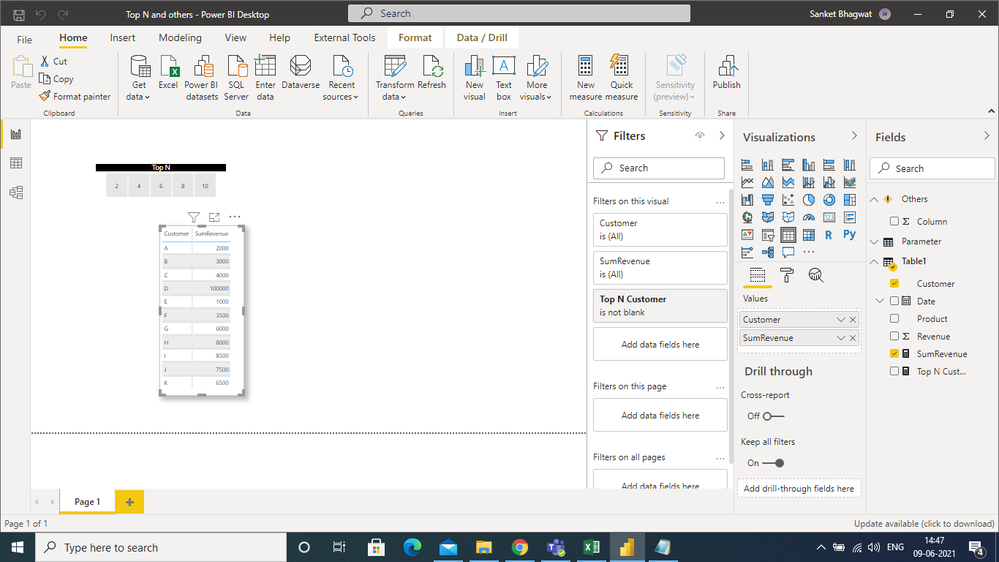
I first created a dynamic Top N slicer according to Customer, but then I was not able to proceed further.
I found one article on the community,https://community.powerbi.com/t5/DAX-Commands-and-Tips/Dynamic-dashboard-that-shows-TOP-N-and-OTHER-...
but that didn't gave me a satisfactory answer.
If someone knows any workaround then do please let me know.
I have attached screenshot of the data.
Regards,
Sanket Bhagwat
Solved! Go to Solution.
Hi, @SanketBhagwat
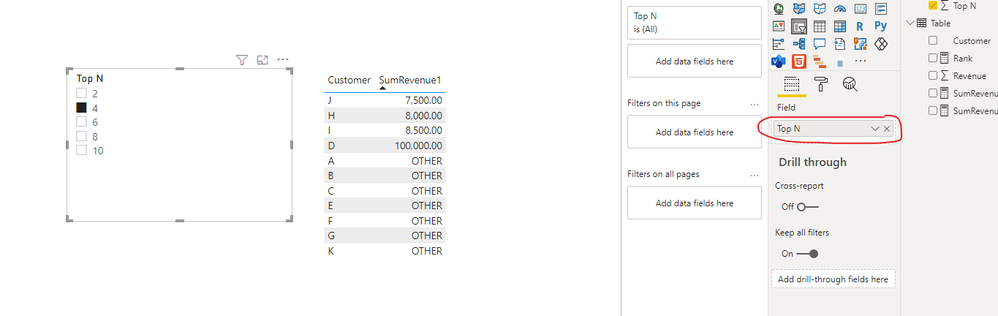
According to your description, I can roughly understand your requirement, I think you can try these measures to achieve your requirement:
First you should create a table for the slicer, which you seems to have finished:
SumRevenue = SUM('Table'[Revenue])Rank =
RANKX(ALL('Table'),CALCULATE([SumRevenue]),,DESC,Dense)SumRevenue1 =
var _topN=SELECTEDVALUE(Slicer[Top N])
return
IF([Rank]<=_topN,[SumRevenue],"OTHER")
And you can get what you want.
You can download my test pbix file below
Thank you very much!
Best Regards,
Community Support Team _Robert Qin
If this post helps, then please consider Accept it as the solution to help the other members find it more quickly.
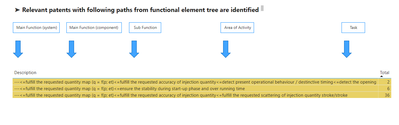
Hi everyone, I'm new to power bi. Please help me separate the data from the virtual table into the corresponding tables as follows:
I want to separate the data lines and from the arrow to fill the data before the arrow in the columns in the respective tables, please help me, thanks a lot
Hi, @SanketBhagwat
According to your description, I can roughly understand your requirement, I think you can try these measures to achieve your requirement:
First you should create a table for the slicer, which you seems to have finished:
SumRevenue = SUM('Table'[Revenue])Rank =
RANKX(ALL('Table'),CALCULATE([SumRevenue]),,DESC,Dense)SumRevenue1 =
var _topN=SELECTEDVALUE(Slicer[Top N])
return
IF([Rank]<=_topN,[SumRevenue],"OTHER")
And you can get what you want.
You can download my test pbix file below
Thank you very much!
Best Regards,
Community Support Team _Robert Qin
If this post helps, then please consider Accept it as the solution to help the other members find it more quickly.
Thanks @v-robertq-msft for the reply.
Yes, I think that can be one of the ways to achieve the same.
Although visually it doesn't look proper, but it definitely serves the purpose.
Regards,
Sanket Bhagwat
The Power BI Data Visualization World Championships is back! Get ahead of the game and start preparing now!
Check out the November 2025 Power BI update to learn about new features.
| User | Count |
|---|---|
| 59 | |
| 43 | |
| 42 | |
| 23 | |
| 17 |
| User | Count |
|---|---|
| 190 | |
| 122 | |
| 96 | |
| 66 | |
| 47 |