Join us at FabCon Atlanta from March 16 - 20, 2026, for the ultimate Fabric, Power BI, AI and SQL community-led event. Save $200 with code FABCOMM.
Register now!The Power BI Data Visualization World Championships is back! It's time to submit your entry. Live now!
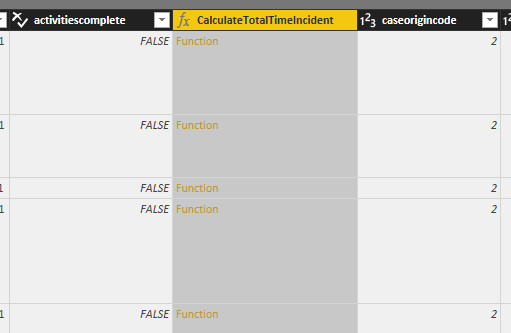
I am creating a report from Dynamics 365 to show data for cases. I want to see how long each record has been open for, fortunately the Dynamics 365 source (incidents table) already provides a function called CalculateTotalTimeIncident.
But I can't figure out how to show the data row by row in Query Editor. How can I extract and consume the data from the formula column?
Solved! Go to Solution.
HI @procurtstinate,
I'd like to suggest you use function methods to invoke store function:
Regards,
Xiaoxin Sheng
HI @procurtstinate,
I'd like to suggest you use function methods to invoke store function:
Regards,
Xiaoxin Sheng
The Power BI Data Visualization World Championships is back! It's time to submit your entry.
Check out the January 2026 Power BI update to learn about new features.
| User | Count |
|---|---|
| 56 | |
| 42 | |
| 41 | |
| 21 | |
| 21 |
| User | Count |
|---|---|
| 150 | |
| 107 | |
| 64 | |
| 36 | |
| 36 |