Join us at FabCon Atlanta from March 16 - 20, 2026, for the ultimate Fabric, Power BI, AI and SQL community-led event. Save $200 with code FABCOMM.
Register now!View all the Fabric Data Days sessions on demand. View schedule
Hi all, I have 2 different tables in my power bi which I am interested in making a pie chart from. Is there any ways to merge this large data set tgt? I give example below
| Total Order |
| 1 |
| 2 |
| 3 |
| 4 |
| 5 |
| Order | Success |
| 1 | Yes |
| 2 | Yes |
| 3 | Yes |
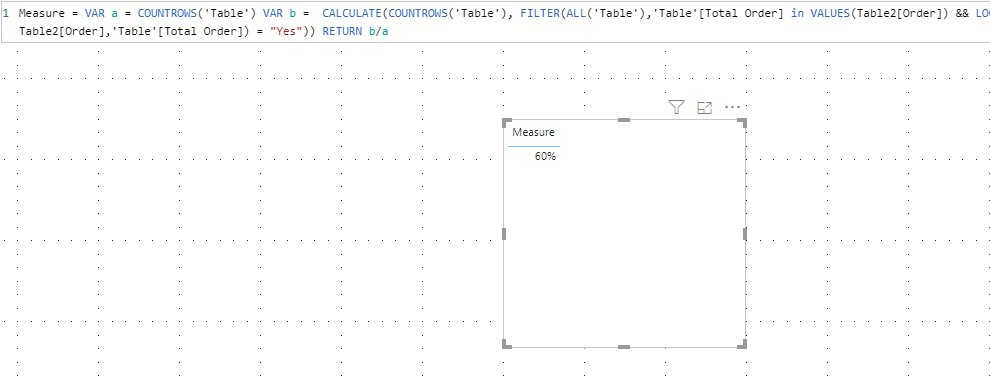
I would like to show a pie chart of Sucess based on column Total Order (which would obviously be 60%) but my powerbi keeps showing it as 100% based on column order even after addition many-many relationship between Order and Total Order.
How does this work with thanks!
Solved! Go to Solution.
You could consider merging those two tables to make the calculation even easier with the first measure. If not, the second measure should work with no relationship between the tables.
Measure1 = calculate(countrows(MergedTable), MergedTable[Success] = "Yes")/countrows(MergedTable)
Measure2 = var denominator = countrows(TotalOrderTable)
var numerator = calculate(countrows(OrderTable), treatas(values(TotalOrderTable[OrderNumberColumn]), OrderTable[OrderNumberColumn]))
return numerator/denominator
If this works for you, please mark it as the solution. Kudos are appreciated too. Please let me know if not.
Regards,
Pat
To learn more about Power BI, follow me on Twitter or subscribe on YouTube.
Hi,
Would you please try to use the following measure:
Measure =
VAR a =
COUNTROWS ( 'Table' )
VAR b =
CALCULATE (
COUNTROWS ( 'Table' ),
FILTER (
ALL ( 'Table' ),
'Table'[Total Order] IN VALUES ( Table2[Order] )
&& LOOKUPVALUE ( Table2[Success], Table2[Order], 'Table'[Total Order] ) = "Yes"
)
)
RETURN
b / a
For more details, please refer to https://qiuyunus-my.sharepoint.com/:u:/g/personal/pbipro_qiuyunus_onmicrosoft_com/EW2exHt7NIZCkM_JNa...
If this post helps, then please consider Accept it as the solution to help the other members find it more quickly.
Best Regards,
Dedmon Dai
Hi,
Would you please try to use the following measure:
Measure =
VAR a =
COUNTROWS ( 'Table' )
VAR b =
CALCULATE (
COUNTROWS ( 'Table' ),
FILTER (
ALL ( 'Table' ),
'Table'[Total Order] IN VALUES ( Table2[Order] )
&& LOOKUPVALUE ( Table2[Success], Table2[Order], 'Table'[Total Order] ) = "Yes"
)
)
RETURN
b / a
For more details, please refer to https://qiuyunus-my.sharepoint.com/:u:/g/personal/pbipro_qiuyunus_onmicrosoft_com/EW2exHt7NIZCkM_JNa...
If this post helps, then please consider Accept it as the solution to help the other members find it more quickly.
Best Regards,
Dedmon Dai
You could consider merging those two tables to make the calculation even easier with the first measure. If not, the second measure should work with no relationship between the tables.
Measure1 = calculate(countrows(MergedTable), MergedTable[Success] = "Yes")/countrows(MergedTable)
Measure2 = var denominator = countrows(TotalOrderTable)
var numerator = calculate(countrows(OrderTable), treatas(values(TotalOrderTable[OrderNumberColumn]), OrderTable[OrderNumberColumn]))
return numerator/denominator
If this works for you, please mark it as the solution. Kudos are appreciated too. Please let me know if not.
Regards,
Pat
To learn more about Power BI, follow me on Twitter or subscribe on YouTube.
Check out the November 2025 Power BI update to learn about new features.
Advance your Data & AI career with 50 days of live learning, contests, hands-on challenges, study groups & certifications and more!