Join us at FabCon Atlanta from March 16 - 20, 2026, for the ultimate Fabric, Power BI, AI and SQL community-led event. Save $200 with code FABCOMM.
Register now!Get Fabric Certified for FREE during Fabric Data Days. Don't miss your chance! Request now
Hello,
I would like to display my company's KPI's in a dashboard. For this I would like to use a "gague chart" for each KPI. My data looks like this:
| KPI | Target | Result |
| kpi1 | 90% | 75% |
| kpi2 | 85% | 80% |
| kpi3 | 85% | 75% |
Now how do I convert each row in to a separate visual?
Thanks for helping me out!
Solved! Go to Solution.
Hi, @Anonymous ;
Since this is a custom visual, Lengend and small multiples are not visible;
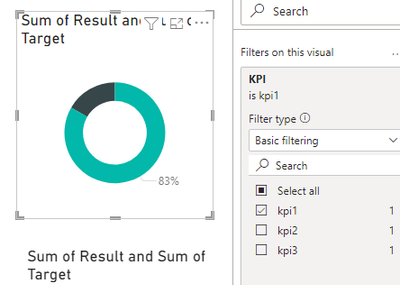
So my suggestion is to copy and paste multiple Gauge visuals, and then change the filter condition for each visual, as follows:
Best Regards,
Community Support Team _ Yalan Wu
If this post helps, then please consider Accept it as the solution to help the other members find it more quickly.
@Anonymous Hi, I too am wondering how to achieve this with the caveat of displaying the gauges dynamically depending on whether a particular KPI row contains data.
For example, say I had 10 different KPI categories, but for this account only 3 of the KPIs contained any target and value so I would only displaye 3 gauegs for wach KPI. Also keeping in mind the possibility that new KPIs could arise and would need to be factored in.
Hi, @Anonymous ;
Since this is a custom visual, Lengend and small multiples are not visible;
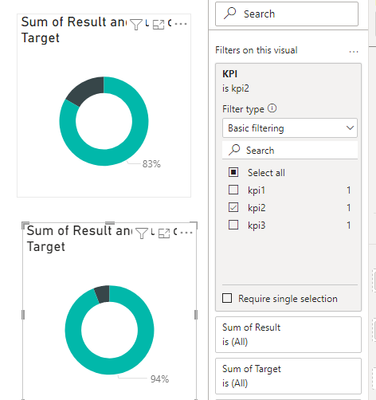
So my suggestion is to copy and paste multiple Gauge visuals, and then change the filter condition for each visual, as follows:
Best Regards,
Community Support Team _ Yalan Wu
If this post helps, then please consider Accept it as the solution to help the other members find it more quickly.
I can move forward with this, thanks!
Check out the November 2025 Power BI update to learn about new features.
Advance your Data & AI career with 50 days of live learning, contests, hands-on challenges, study groups & certifications and more!