cancel
Showing results for 
Search instead for 
Did you mean: 

Get Fabric Certified for FREE during Fabric Data Days. Don't miss your chance! Request now

Reply
Anonymous
Not applicable

Show Date Slicer results in Text box ordered by Year then Month.

Hello all, 

I have trawled the forum looking for an answer but haven't found quite what I need, therefore I am hoping someone can help me directly please.

I have a slicer which shows the Year and Month. Users can select multiple months.
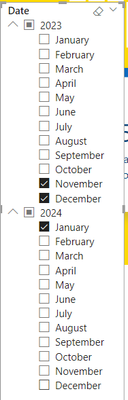
AP23_1-1700743173335.png

I want to display the results in a text box showing the Year(1) and associated months and Year(2) and associated months e.g.

2023: November, December

2024: January


I've seen many ways of concatonating the months which I've got working, but the years are then out of order

For example:

var A = CONCATENATEX ( VALUES ( Child[data.startDate].[Month] ) , [Month]" | ")
var B = CONCATENATEXVALUES ( Child[data.startDate].[Year] ) , [Year] " | ")
var C= UNICHAR(10)
return
A & C & B
which results in the following:
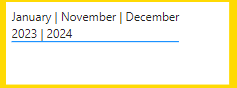
AP23_2-1700743456174.png


I've also tried using Min(month) and Min(year) & Max(month) and Max(year) but this results in e.g.

"January 2023 to December 2024" 


How can I achieve the desired result please? Many thanks in advance.

1 ACCEPTED SOLUTION
amitchandak
Super User
Super User

@Anonymous , Try to avoid auto date hierarchy.


Measure =

var _max = maxx(allselected(Child), Child[data.startDate])

var _min = minx(allselected(Child), Child[data.startDate])

return

format(_min, "mmmm-yyyy") & " to " & format(_max, "mmmm-yyyy")

Share with Power BI Enthusiasts: Full Power BI Video (20 Hours) YouTube
Microsoft Fabric Series 60+ Videos YouTube
Microsoft Fabric Hindi End to End YouTube

View solution in original post

2 REPLIES 2
amitchandak
Super User
Super User

@Anonymous , Try to avoid auto date hierarchy.


Measure =

var _max = maxx(allselected(Child), Child[data.startDate])

var _min = minx(allselected(Child), Child[data.startDate])

return

format(_min, "mmmm-yyyy") & " to " & format(_max, "mmmm-yyyy")

Share with Power BI Enthusiasts: Full Power BI Video (20 Hours) YouTube
Microsoft Fabric Series 60+ Videos YouTube
Microsoft Fabric Hindi End to End YouTube
Anonymous
Not applicable

Thanks so much. Simple when you know how!!

Works perfectly 🙂

Helpful resources

Announcements
November Power BI Update Carousel

Power BI Monthly Update - November 2025

Check out the November 2025 Power BI update to learn about new features.

Fabric Data Days Carousel

Fabric Data Days

Advance your Data & AI career with 50 days of live learning, contests, hands-on challenges, study groups & certifications and more!

FabCon Atlanta 2026 carousel

FabCon Atlanta 2026

Join us at FabCon Atlanta, March 16-20, for the ultimate Fabric, Power BI, AI and SQL community-led event. Save $200 with code FABCOMM.

Top Solution Authors
Top Kudoed Authors