Join us at FabCon Atlanta from March 16 - 20, 2026, for the ultimate Fabric, Power BI, AI and SQL community-led event. Save $200 with code FABCOMM.
Register now!The Power BI Data Visualization World Championships is back! Get ahead of the game and start preparing now! Learn more
Hello!
I have a Line Chart with:
- Axis -> Period (string because it is a combination like FEB-2019, MAR-2019, APR-2019...)
- Legend -> Entity (string)
- Values -> Measure with a calculate that SUM a KPI Values, filtered by DATESINPERIOD by month, in order to show a number of months since the last month with data.
We need to show in the visual all the data, included the blanks fields. To do that, we have activated the option 'Show Items with no data' and it seems that it worked when there is no filters. The problem i.e. is that when we use a slicer 'Period' to show for example APR-2019 and a slicer to filter for Entity, visuals only show April and the month that has data, in this case, January. So I can't see February and March, even it has no data and I have activated the option.
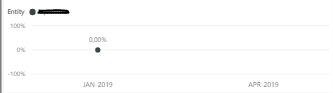
Also, we have tried with this measure, in order to show Blanks() if the KPI is blank -->
Old post, but not flagged as solved.
Here is the solution:
Show items with no data in Power BI - Power BI | Microsoft Learn
Hello,
Did you find a solution for this? I have a similar use-case.
HI @Anonymous ,
In your scenario, you can try to change the measure to the following one:
KPIAUX_NODATA = IF(ISBLANK(GRC_F_KPI[KPI_LAST12MONTHS]),0,GRC_F_KPI[KPI_LAST12MONTHS])
The blank will not be displayed in the visual, you can change it to some other value like 0.
Best Regards,
Teige
Hello @TeigeGao
Thanks so much for your reply but this is another extra problem for us. We can not use 0 values, because it means something in our data set. A 0 value is also an indicator (KPI) for our dataset.
The Power BI Data Visualization World Championships is back! Get ahead of the game and start preparing now!
Check out the November 2025 Power BI update to learn about new features.
| User | Count |
|---|---|
| 59 | |
| 46 | |
| 42 | |
| 23 | |
| 17 |
| User | Count |
|---|---|
| 190 | |
| 122 | |
| 96 | |
| 66 | |
| 47 |