cancel
Showing results for 
Search instead for 
Did you mean: 

The Power BI Data Visualization World Championships is back! Get ahead of the game and start preparing now! Learn more

Reply
sj_
Frequent Visitor

Show 0 in matrix when there is no data (blank) -- Count + 0 does not work

Can somebody help me with this?

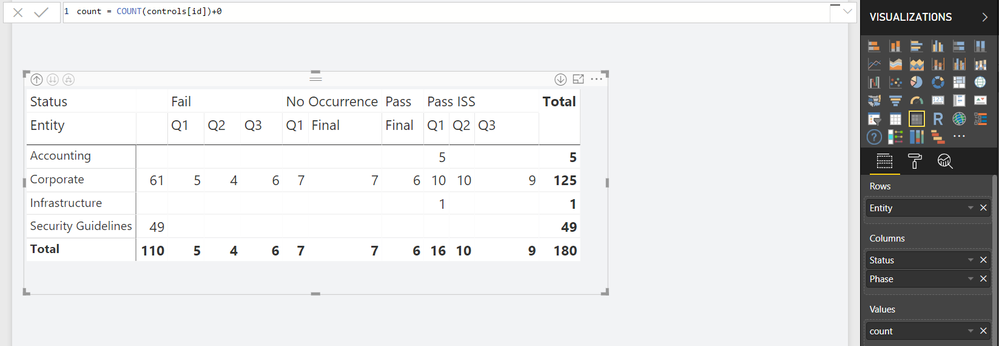
How do I make a matrix show 0s instead of blank?

I tried 

  • if(isblank(count),0,count)
  • count + 0

but it doesn't work


Capture.PNG

1 ACCEPTED SOLUTION
Anonymous
Not applicable

@sj_  - The problem is that all of the rows/columns come from the same table. There simply is no intersection of those attributes (they are filtered out of the result set). One way to fix this is by creating a Dimensional Model, where a fact table is related to dimension tables. Dimensional models are ideal in Power BI. For this particular case, your visual would behave as desired if you do the following:

1. Create a new Calculated Table:

Entity = DISTINCT(controls[Entity])

2. Replace Entity in the Matrix with Entity from the new Entity table.

Cheers,

Nathan

View solution in original post

6 REPLIES 6
Anonymous
Not applicable

@sj_  - 

It's strange - Could you share your pbix?

Thanks,

Nathan

sj_
Frequent Visitor

https://drive.google.com/file/d/1Vnoe0MzD7AKlqmLA_Ioyl4wkDzP7jWRb/view?usp=sharing


here is the pbix file. Please let me know if you cannot open the file. and thank you for your help! 

Anonymous
Not applicable

Have you tried ISFILTERED or HASONEVALUE?

sj_
Frequent Visitor

Hi! Could you elaborate on this? 

ISFILTERED or HASONEVALUE takes an existing column as a parameter. What columns would you use to make 0s appear? 

Anonymous
Not applicable

@sj_  - The problem is that all of the rows/columns come from the same table. There simply is no intersection of those attributes (they are filtered out of the result set). One way to fix this is by creating a Dimensional Model, where a fact table is related to dimension tables. Dimensional models are ideal in Power BI. For this particular case, your visual would behave as desired if you do the following:

1. Create a new Calculated Table:

Entity = DISTINCT(controls[Entity])

2. Replace Entity in the Matrix with Entity from the new Entity table.

Cheers,

Nathan

sj_
Frequent Visitor

My real file is connected to a sql database, so unfortunately I cannot create a calculated table for this.

But, it makes sense to me why it is happening. Thank you so much for your help! 

Helpful resources

Announcements
Power BI DataViz World Championships

Power BI Dataviz World Championships

The Power BI Data Visualization World Championships is back! Get ahead of the game and start preparing now!

December 2025 Power BI Update Carousel

Power BI Monthly Update - December 2025

Check out the December 2025 Power BI Holiday Recap!

FabCon Atlanta 2026 carousel

FabCon Atlanta 2026

Join us at FabCon Atlanta, March 16-20, for the ultimate Fabric, Power BI, AI and SQL community-led event. Save $200 with code FABCOMM.