Join us at FabCon Atlanta from March 16 - 20, 2026, for the ultimate Fabric, Power BI, AI and SQL community-led event. Save $200 with code FABCOMM.
Register now!The Power BI Data Visualization World Championships is back! Get ahead of the game and start preparing now! Learn more
Afternoon all,
Have been reading and searching trying to figure this one out and still failing. TIme for experts!
I have two UNrelated tables. The second table, Month_Count, is for some specific charting. It contains a Date format column with Month-Year. My primary table, Query1 for public purposes, contains a calculated column resulting in the same format date. I need to do a count of the times each month-year appears.
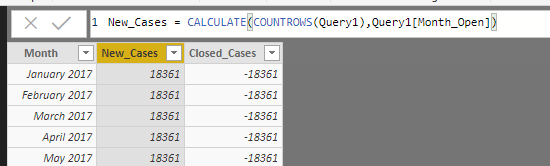
If I relate the Month_Count to either (Query1[Month_Open]) or [Month_Close], I can get the right number. The other field simply matches it so I know I need another function in there. (Yes I want the "closed" to be a negative number.) Obviously, I am just getting a count of all rows without the relation as it appears in the picture.
Here is the DAX from the (Query1 [Month_Open] ) just in case:
Solved! Go to Solution.
You need to set the count filter so it is only grabbing rows equal to the month on the first column. I would use the following formula to achieve what you are looking for. This is similar to doing a COUNTIF in Excel.
New_Cases = CALCULATE(COUNT(‘Query1’[Month_Open]),FILTER(‘Query1’,'Query1'[Month_Open]='New Table'[Month]))
I didn't know the name of your new table, so I just titled it new table in my formula.
You need to set the count filter so it is only grabbing rows equal to the month on the first column. I would use the following formula to achieve what you are looking for. This is similar to doing a COUNTIF in Excel.
New_Cases = CALCULATE(COUNT(‘Query1’[Month_Open]),FILTER(‘Query1’,'Query1'[Month_Open]='New Table'[Month]))
I didn't know the name of your new table, so I just titled it new table in my formula.
Ah...I got hung up on a Countrows not a simple count.
Many thanks.
Happily accepted as a solution!
TrentS
The Power BI Data Visualization World Championships is back! Get ahead of the game and start preparing now!
| User | Count |
|---|---|
| 40 | |
| 37 | |
| 35 | |
| 31 | |
| 28 |
| User | Count |
|---|---|
| 137 | |
| 102 | |
| 71 | |
| 67 | |
| 65 |