Don't miss your chance to take the Fabric Data Engineer (DP-600) exam for FREE! Find out how by attending the DP-600 session on April 23rd (pacific time), live or on-demand.
Learn moreJoin the FabCon + SQLCon recap series. Up next: Power BI, Real-Time Intelligence, IQ and AI, and Data Factory take center stage. All sessions are available on-demand after the live show. Register now
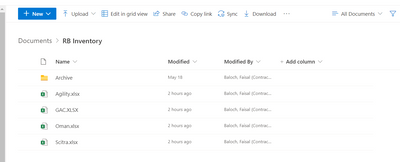
I am getting below error while connecting excel files on Sharepoint location. I can manually access all the files but Sharepoint Folder is throwing below error. Please advice:
Solved! Go to Solution.
It seems you didn't use the correct connector or enter a valid URL with the correct format.
If you want to connect to a single Excel file stored in Sharepoint online, copy its link from Sharepoint online and use Get data > Web in Power BI Desktop. It's similar to connect to an Excel file stored in OneDrive for Business.
Use OneDrive for Business links in Power BI Desktop
If you want to connect to a Sharepoint folder which contains multiple Excel files and hope to combine them into one, you can use the SharePoint Folder connector. Paste the address into the Site URL text box in the SharePoint folder dialog box, which is similar to https://contoso.sharepoint.com/marketing/data.
Power Query SharePoint Folder connector
Regards,
Community Support Team _ Jing
If this post helps, please Accept it as the solution to help other members find it.
It seems you didn't use the correct connector or enter a valid URL with the correct format.
If you want to connect to a single Excel file stored in Sharepoint online, copy its link from Sharepoint online and use Get data > Web in Power BI Desktop. It's similar to connect to an Excel file stored in OneDrive for Business.
Use OneDrive for Business links in Power BI Desktop
If you want to connect to a Sharepoint folder which contains multiple Excel files and hope to combine them into one, you can use the SharePoint Folder connector. Paste the address into the Site URL text box in the SharePoint folder dialog box, which is similar to https://contoso.sharepoint.com/marketing/data.
Power Query SharePoint Folder connector
Regards,
Community Support Team _ Jing
If this post helps, please Accept it as the solution to help other members find it.
Check out the April 2026 Power BI update to learn about new features.
If you have recently started exploring Fabric, we'd love to hear how it's going. Your feedback can help with product improvements.
A new Power BI DataViz World Championship is coming this June! Don't miss out on submitting your entry.
| User | Count |
|---|---|
| 48 | |
| 46 | |
| 41 | |
| 20 | |
| 17 |
| User | Count |
|---|---|
| 69 | |
| 67 | |
| 32 | |
| 27 | |
| 26 |