Join us at FabCon Atlanta from March 16 - 20, 2026, for the ultimate Fabric, Power BI, AI and SQL community-led event. Save $200 with code FABCOMM.
Register now!The Power BI Data Visualization World Championships is back! Get ahead of the game and start preparing now! Learn more
Update:
While I am the owner of my site collection and all subsites in SharePoint, there is something wonky with the permissions for the parent and one subsite, but I can get to my task list for all other subsites. Trying to figure out the permission differences now, but at least I figured out half of it :)!
Hello,
Preface - I am not a coder. Any suggestions would be greatly appreciated. Thanks much in advance. Kerry
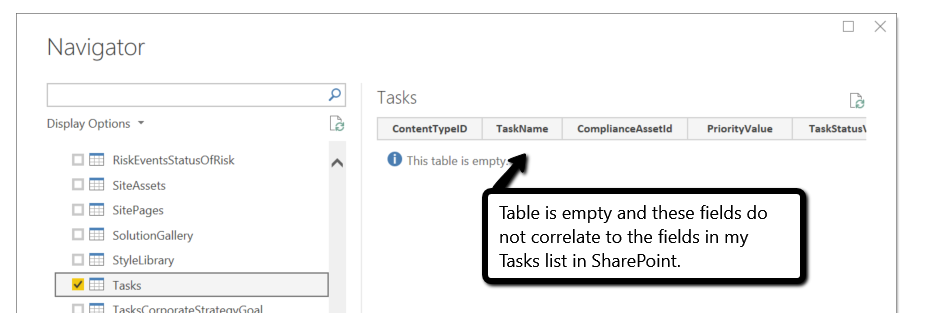
I am using PowerBI desktop and am linking to my SharePoint lists via OData (http://siteurl/_vti_bin/listdata.svc). When I connect, I see a bunch of tables, but some are empty. Specifically, the Task table.
Few things to note:
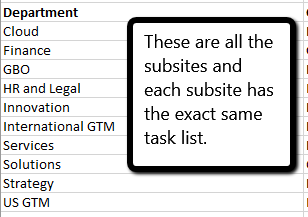
- I have a SharePoint site collection with several subsites. What I was hoping for is a task list for each subsite. Each site has the exact same structure for the task list.
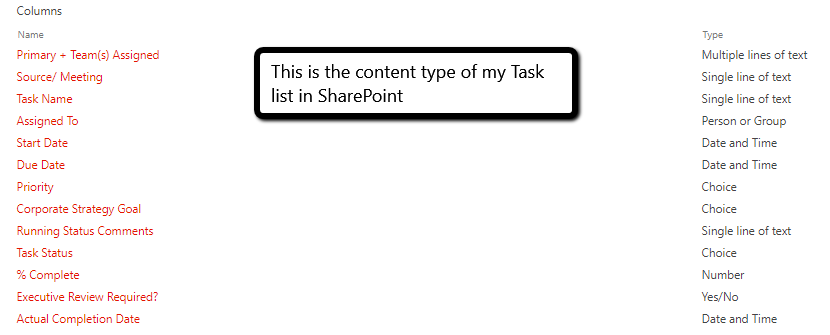
- I have customized the task list, but am using the "New experience" for SharePoint, so the data types should all be aligned with the column content.
- I've tried to log out and log back in and refresh the data.
Few screen shots might help...
@Anonymous ,
You might need to check the permission. Clear permissions in data source settings and try again.
The Power BI Data Visualization World Championships is back! Get ahead of the game and start preparing now!
| User | Count |
|---|---|
| 40 | |
| 35 | |
| 34 | |
| 31 | |
| 28 |
| User | Count |
|---|---|
| 137 | |
| 102 | |
| 68 | |
| 66 | |
| 64 |