Join us at FabCon Atlanta from March 16 - 20, 2026, for the ultimate Fabric, Power BI, AI and SQL community-led event. Save $200 with code FABCOMM.
Register now!The Power BI Data Visualization World Championships is back! Get ahead of the game and start preparing now! Learn more
Hi Everyone.
I've had a SharePoint list refresh fail) via the service.
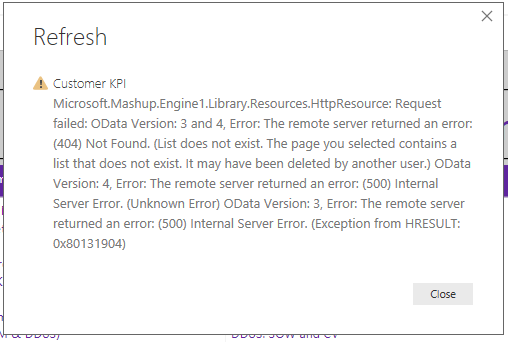
I've tried to manually refresh from my Desktop client (July 2018) Release and received the error message below.
Now, I have added a PowerApp form to this particular list this morning. I have not added any new fields.
I am also having difficultity displaying the list and using the filters in Internet Explorer...
If it's a problem with MS in the cloud - how would I find this out? It's all guesswork at the moment.
- David
Solved! Go to Solution.
Hi @Anonymous
The fault corrected itself after about 4 hours. I'm suspecting an issue within the hosting cloud data centre (the SharePoint list is on O365).
> current power bi desktop not support to get data form power app, I think your issue may related to it.
To be clear... the PowerApp was used to update the SharePoint List. PowerBI content is refreshed from the SharePoint List every 2 hours via the Service.
- David
HI @dgwilson,
>>I have added a PowerApp form to this particular list this morning. I have not added any new fields.
Can you explain more about this? I'm not so clear for your operations.
How to Get Your Question Answered Quickly
Based on your error message, it seems like both power bi desktop and remote server side can't correct analysis and recognize these httprequests.
BTW, current power bi desktop not support to get data form power app, I think your issue may related to it.
Regards,
Xiaoxin Sheng
Hi @Anonymous
The fault corrected itself after about 4 hours. I'm suspecting an issue within the hosting cloud data centre (the SharePoint list is on O365).
> current power bi desktop not support to get data form power app, I think your issue may related to it.
To be clear... the PowerApp was used to update the SharePoint List. PowerBI content is refreshed from the SharePoint List every 2 hours via the Service.
- David
The Power BI Data Visualization World Championships is back! Get ahead of the game and start preparing now!
| User | Count |
|---|---|
| 40 | |
| 37 | |
| 33 | |
| 29 | |
| 27 |
| User | Count |
|---|---|
| 133 | |
| 104 | |
| 61 | |
| 59 | |
| 55 |