Get certified for free when you join Fabric Data Days 2026 and dive into Fabric, Power BI, SQL, AI, and other essential data skills.
Join nowData Days is here! Join us now for 60+ days of learning, challenges, and connection. Learn more
Hi everyone,
I've been using Map Shape Visuals in Power BI Desktop for a while and since there was a modification of the visualization pane I can't find the option to choose my saturation color and set saturation values.
There are options to select the borders color, to select the empty zones color but no option to select the saturation color and values. I'm stuck with the default blue.
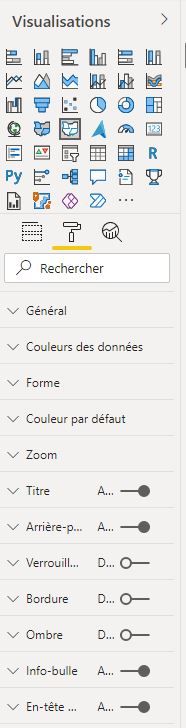
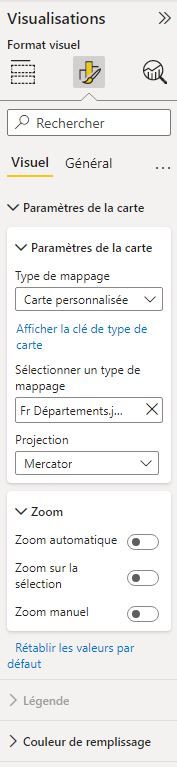
Here are some screen shots from the old visualisation pane (2 pics on the left) and the new one (2 pics on the right) (in French).
Old visualization menu
New visualization menu
I think the Power BI developers forgot to put this option in the new visualization pane.
Can someone tell them about it, please ?
Best regards and mery christmas to everyone.
Julien.
Solved! Go to Solution.
Hi, @Julber75
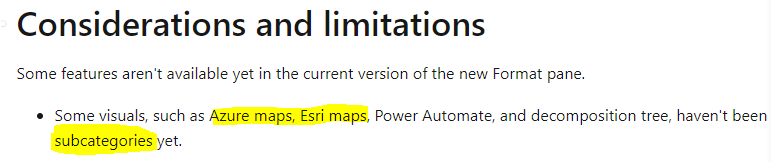
It is a known limitation that is mentioned in the official document, which will be added to the new format pane in the future:
You can still use the old format pane.
For more info:
Best Regards,
Community Support Team _ Zeon Zheng
If this post helps, then please consider Accept it as the solution to help the other members find it more quickly.
Hi, @Julber75
It is a known limitation that is mentioned in the official document, which will be added to the new format pane in the future:
You can still use the old format pane.
For more info:
Best Regards,
Community Support Team _ Zeon Zheng
If this post helps, then please consider Accept it as the solution to help the other members find it more quickly.
Hi,
Thank you for your answer. Although I find it weird to migrate only partially those features, I will wait for MS to complete the job.
Best regards and happy holidays.
@Julber75 , I checked it out seem like it is missing
please log an issue
https://community.powerbi.com/t5/Issues/idb-p/Issues
Hi amitchandak,
Done.
Don't miss out on Data Days, June 15 through August 7. Learn Fabric, Power BI, SQL, AI and more.
Check out the May 2026 Power BI update to learn about new features.
| User | Count |
|---|---|
| 23 | |
| 23 | |
| 21 | |
| 17 | |
| 14 |
| User | Count |
|---|---|
| 58 | |
| 50 | |
| 37 | |
| 29 | |
| 24 |