Don't miss your chance to take the Fabric Data Engineer (DP-700) exam on us!
Learn moreNext up in the FabCon + SQLCon recap series: The roadmap for Microsoft SQL and Maximizing Developer experiences in Fabric. All sessions are available on-demand after the live show. Register now
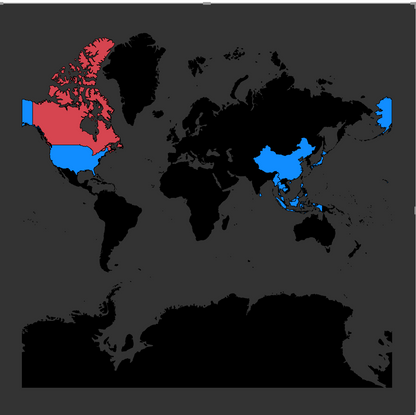
When I use shape Map (the world map), I found that unlike filled map, when I move the map left or right, it will not continuouly regenerate maps as I move (see below two photos), instead it only show blank.
My problem is that I don't want to have the US area split into two part at the very left and very right of the map, so is there any way to either
1) regenrate the map just as what the filled map do.
2) edit the shape map JSON file to move the entire map a little bit to the right side, so the US area will become one part.
Thanks!
hi Frank,
Has this been improved since the issue was originally posted here ?
I have the same request as well - want to make sure the main countries map not splitted
Hi @Elvis ,
Based on my research, it is not supported yet currently. You can come up a new idea and add your comments there to make this feature coming sooner.
https://ideas.powerbi.com/forums/265200-power-bi-ideas3
If you have recently started exploring Fabric, we'd love to hear how it's going. Your feedback can help with product improvements.
A new Power BI DataViz World Championship is coming this June! Don't miss out on submitting your entry.
Share feedback directly with Fabric product managers, participate in targeted research studies and influence the Fabric roadmap.
| User | Count |
|---|---|
| 48 | |
| 45 | |
| 41 | |
| 19 | |
| 18 |
| User | Count |
|---|---|
| 68 | |
| 68 | |
| 33 | |
| 32 | |
| 31 |