Get certified for free when you join Fabric Data Days 2026 and dive into Fabric, Power BI, SQL, AI, and other essential data skills.
Join nowJuly 7 - July 17 | Round 2 of the Power BI Dataviz World Championships. Don't miss your chance! Learn more
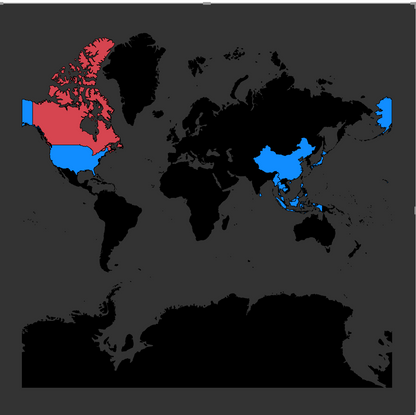
When I use shape Map (the world map), I found that unlike filled map, when I move the map left or right, it will not continuouly regenerate maps as I move (see below two photos), instead it only show blank.
My problem is that I don't want to have the US area split into two part at the very left and very right of the map, so is there any way to either
1) regenrate the map just as what the filled map do.
2) edit the shape map JSON file to move the entire map a little bit to the right side, so the US area will become one part.
Thanks!
hi Frank,
Has this been improved since the issue was originally posted here ?
I have the same request as well - want to make sure the main countries map not splitted
Hi @Elvis ,
Based on my research, it is not supported yet currently. You can come up a new idea and add your comments there to make this feature coming sooner.
https://ideas.powerbi.com/forums/265200-power-bi-ideas3
Join us in Barcelona for FabCon and SQLCon, the Fabric, Power BI, SQL, and AI community event. Save €200 with code FABCMTY200.
Join Data Days 2026: 60 days of free live/on-demand sessions, challenges, study groups, and certification opportunities.
| User | Count |
|---|---|
| 27 | |
| 23 | |
| 18 | |
| 18 | |
| 15 |
| User | Count |
|---|---|
| 53 | |
| 44 | |
| 42 | |
| 39 | |
| 34 |