cancel
Showing results for 
Search instead for 
Did you mean: 

The Power BI Data Visualization World Championships is back! Get ahead of the game and start preparing now! Learn more

Reply
FAY2020
Resolver I
Resolver I

Shape Map Colour Saturation Scale Not Dynamic

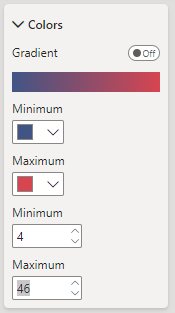
When creating a Shape Map visual, the min and max for colour saturation require values. Normally (such as with conditional formatting) when deleting the values from these inputs, Power BI defaults to the min and max values in the data, but the visual doesn't allow deletion. I can set arbitrary numbers but these won't change as my data changes. This means at times all the colours can be the same, defeating the point.

FAY2020_0-1688736727713.png


3 REPLIES 3
FAY2020
Resolver I
Resolver I

Thanks, but I'm not raising an idea that a bug should be fixed that will never even get near a backlog.

you cannot win the lottery if you don't play. Submitting the idea is a necessary step even if you think it is futile.


If you have a Pro license you can consider raising a Pro ticket at https://admin.powerplatform.microsoft.com/newsupportticket/powerbi

lbendlin
Super User
Super User

If this is important to you please consider voting for an existing idea or raising a new one at https://ideas.fabric.microsoft.com/?forum=2d80fd4a-16cb-4189-896b-e0dac5e08b41

Helpful resources

Announcements
Power BI DataViz World Championships

Power BI Dataviz World Championships

The Power BI Data Visualization World Championships is back! Get ahead of the game and start preparing now!

December 2025 Power BI Update Carousel

Power BI Monthly Update - December 2025

Check out the December 2025 Power BI Holiday Recap!

FabCon Atlanta 2026 carousel

FabCon Atlanta 2026

Join us at FabCon Atlanta, March 16-20, for the ultimate Fabric, Power BI, AI and SQL community-led event. Save $200 with code FABCOMM.