Join us at FabCon Atlanta from March 16 - 20, 2026, for the ultimate Fabric, Power BI, AI and SQL community-led event. Save $200 with code FABCOMM.
Register now!Learn from the best! Meet the four finalists headed to the FINALS of the Power BI Dataviz World Championships! Register now
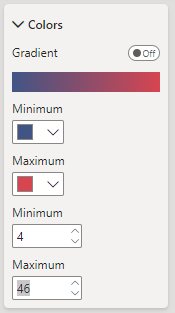
When creating a Shape Map visual, the min and max for colour saturation require values. Normally (such as with conditional formatting) when deleting the values from these inputs, Power BI defaults to the min and max values in the data, but the visual doesn't allow deletion. I can set arbitrary numbers but these won't change as my data changes. This means at times all the colours can be the same, defeating the point.
Thanks, but I'm not raising an idea that a bug should be fixed that will never even get near a backlog.
you cannot win the lottery if you don't play. Submitting the idea is a necessary step even if you think it is futile.
If you have a Pro license you can consider raising a Pro ticket at https://admin.powerplatform.microsoft.com/newsupportticket/powerbi
If this is important to you please consider voting for an existing idea or raising a new one at https://ideas.fabric.microsoft.com/?forum=2d80fd4a-16cb-4189-896b-e0dac5e08b41
Share feedback directly with Fabric product managers, participate in targeted research studies and influence the Fabric roadmap.
Check out the February 2026 Power BI update to learn about new features.
| User | Count |
|---|---|
| 50 | |
| 49 | |
| 35 | |
| 15 | |
| 14 |
| User | Count |
|---|---|
| 92 | |
| 75 | |
| 41 | |
| 26 | |
| 25 |