This time we’re going bigger than ever. Fabric, Power BI, SQL, AI and more. We're covering it all. You won't want to miss it.
Learn moreDid you hear? There's a new SQL AI Developer certification (DP-800). Start preparing now and be one of the first to get certified. Register now
I'm having an issue when I try to create a Shape Map. When I select the data it is blank. I've tried/troubleshot the following:
- Shape Map visual option is turned on in Preview Settings
- Not a network issue, all other Power BI maps work
- Map Data is categorized correctly (i.e. city and state)
- Value data is numerical and not summarized
I would appreciate any help. Thanks,
Solved! Go to Solution.
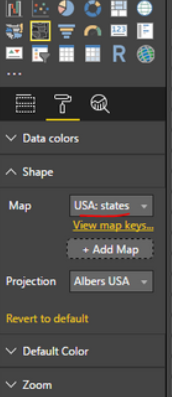
@bbillman did you try to adjust following properties, and also go to Modeling tab try to change the "Category" type to PLACE
It was initially set on US States and blank, I then selected another country and the map appeared. I went back to US States and it worked. Thanks for the help!
Check out the April 2026 Power BI update to learn about new features.
Sign up to receive a private message when registration opens and key events begin.
If you have recently started exploring Fabric, we'd love to hear how it's going. Your feedback can help with product improvements.
| User | Count |
|---|---|
| 34 | |
| 31 | |
| 30 | |
| 21 | |
| 16 |
| User | Count |
|---|---|
| 62 | |
| 51 | |
| 31 | |
| 23 | |
| 23 |