FabCon is coming to Atlanta
Join us at FabCon Atlanta from March 16 - 20, 2026, for the ultimate Fabric, Power BI, AI and SQL community-led event. Save $200 with code FABCOMM.
Register now!- Power BI forums
- Get Help with Power BI
- Desktop
- Service
- Report Server
- Power Query
- Mobile Apps
- Developer
- DAX Commands and Tips
- Custom Visuals Development Discussion
- Health and Life Sciences
- Power BI Spanish forums
- Translated Spanish Desktop
- Training and Consulting
- Instructor Led Training
- Dashboard in a Day for Women, by Women
- Galleries
- Data Stories Gallery
- Themes Gallery
- Contests Gallery
- QuickViz Gallery
- Quick Measures Gallery
- Visual Calculations Gallery
- Notebook Gallery
- Translytical Task Flow Gallery
- TMDL Gallery
- R Script Showcase
- Webinars and Video Gallery
- Ideas
- Custom Visuals Ideas (read-only)
- Issues
- Issues
- Events
- Upcoming Events
The Power BI Data Visualization World Championships is back! Get ahead of the game and start preparing now! Learn more
- Power BI forums
- Forums
- Get Help with Power BI
- Desktop
- Re: Service Level Issue - Days Not Showing Correct...
- Subscribe to RSS Feed
- Mark Topic as New
- Mark Topic as Read
- Float this Topic for Current User
- Bookmark
- Subscribe
- Printer Friendly Page

- Mark as New
- Bookmark
- Subscribe
- Mute
- Subscribe to RSS Feed
- Permalink
- Report Inappropriate Content
Service Level Issue - Days Not Showing Correct Result
Hello Power BI Community, I am facing an issue with a Power BI graph visual that involves service level calculations.
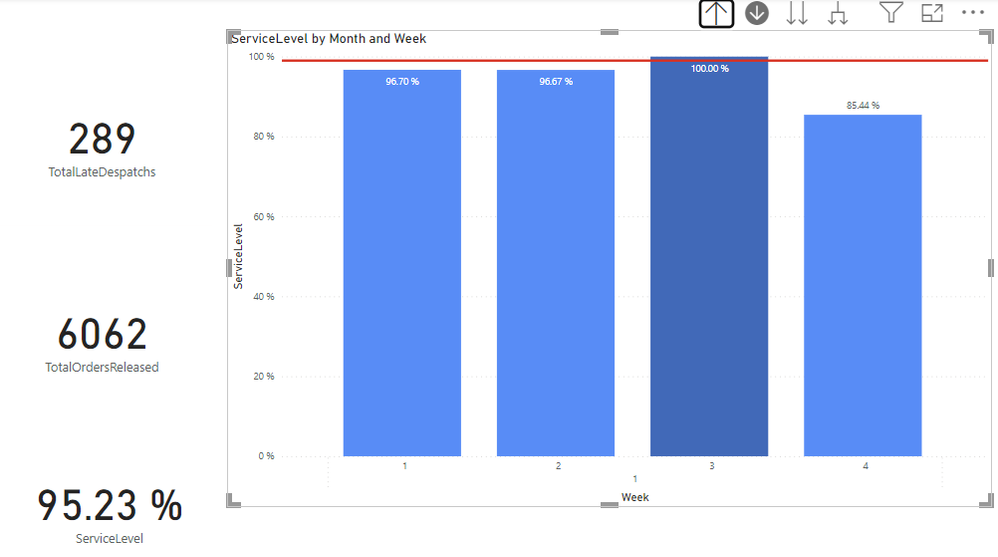
Here's a brief overview of the problem: I have successfully calculated the service level and created a graph visual that displays the weeks of January. The initial results are correct. However, when I click on the weeks, the days do not show the right result. I've created two columns:
ReleasedAfterCutoff = IF(TIME(HOUR('Pick detail report (7)'[Action created at (time)]), MINUTE('Pick detail report (7)'[Action created at (time)]), SECOND('Pick detail report (7)'[Action created at (time)])) < TIME(16, 15, 0), 1, 0)
IsLateDespatch = IF(TIME(HOUR('Despatch summary (7)'[Despatch date (time)]), MINUTE('Despatch summary (7)'[Despatch date (time)]), SECOND('Despatch summary (7)'[Despatch date (time)])) > TIME(16, 30, 0), 1, 0)
And the measures I'm using:
TotalOrdersReleased = CALCULATE(COUNTROWS('Pick detail report (7)'), 'Pick detail report (7)'[ReleasedAfterCutoff] = 0)
TotalLateDespatches = CALCULATE(COUNTROWS('Despatch summary (7)'), 'Despatch summary (7)'[IsLateDespatch] = 1) ServiceLevel = DIVIDE([TotalOrdersReleased] - [TotalLateDespatches], [TotalOrdersReleased], 0)
I need help in understanding why the days are not showing the correct results when I click on the weeks in the graph visual. Any insights or suggestions on how to troubleshoot and resolve this issue would be greatly appreciated. Thank you in advance for your assistance!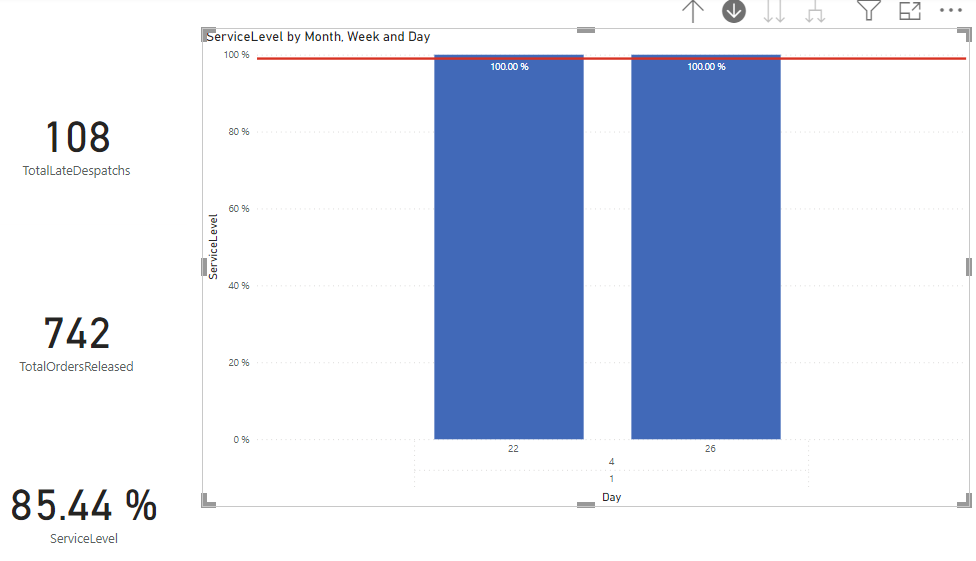
Solved! Go to Solution.
- Mark as New
- Bookmark
- Subscribe
- Mute
- Subscribe to RSS Feed
- Permalink
- Report Inappropriate Content
Hi @Anonymous ,
You can create a measure.
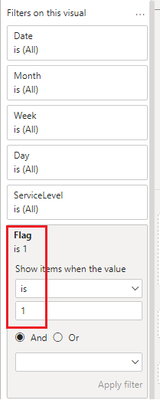
TotalLateDespatchs = COUNTROWS(FILTER('Despatch summary (7)','Despatch summary (7)'[IsLateDespatch] = 1))Flag = IF([ServiceLevel]=1,0,1)
Then talk about [Flag=1] placed on the visual object filter.
Best Regards,
Neeko Tang
If this post helps, then please consider Accept it as the solution to help the other members find it more quickly.
- Mark as New
- Bookmark
- Subscribe
- Mute
- Subscribe to RSS Feed
- Permalink
- Report Inappropriate Content
Hi @Anonymous ,
Update measures.
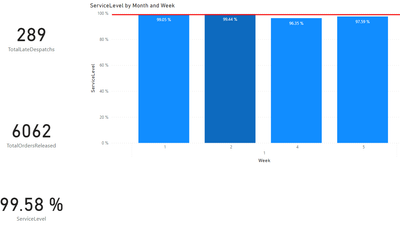
TotalLateDespatchs = COUNTROWS(FILTER(ALLSELECTED('Despatch summary (7)'),'Despatch summary (7)'[IsLateDespatch] = 1))TotalOrdersReleased = COUNTROWS(FILTER('Pick detail report (7)','Pick detail report (7)'[ReleasedAfterCutoff] = 0))Then the result is as follows.
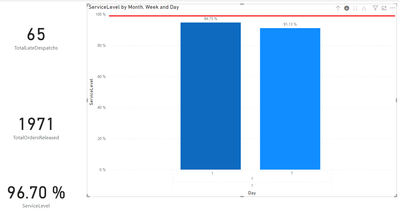
If the above one can't help you get the desired result, please provide your expected result with backend logic and special examples.
Best Regards,
Neeko Tang
If this post helps, then please consider Accept it as the solution to help the other members find it more quickly.
- Mark as New
- Bookmark
- Subscribe
- Mute
- Subscribe to RSS Feed
- Permalink
- Report Inappropriate Content
Hi @Anonymous,
Thanks for the answer!
I updated my measures as you described and I changed service level measure from: ServiceLevel = DIVIDE(([TotalOrdersReleased] - [TotalLateDespatchs]), [TotalOrdersReleased])
To:
ServiceLevel = 1-DIVIDE([TotalLateDespatchs],DISTINCTCOUNT('Pick detail report (7)'[Sales order number]))
As I wanted to see the service level from the total orders released and not on the orders released after cut-off.
Allow me to describe the desired outcome. The graph shows six weeks, even though there should only be four. The total service level should be 99.58%, according to the card visual in the bottom left corner, but when I look at the graph, all of the weeks have less than 99%, which makes no sense to me.
Then when I click on week 2 - it shows more than 13 days and it should only show day 8 to 14.
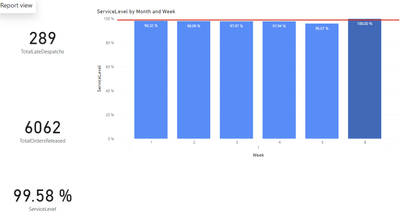
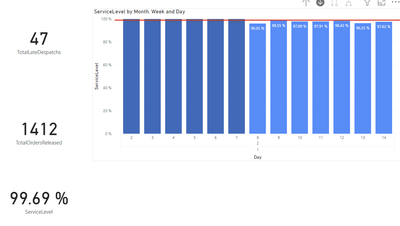
I have attached the new PBIX with the changes I have made: https://we.tl/t-SzDQFTlPuX
I hope this clarifies my problems.
- Mark as New
- Bookmark
- Subscribe
- Mute
- Subscribe to RSS Feed
- Permalink
- Report Inappropriate Content
Hi @Anonymous ,
You can create a measure.
TotalLateDespatchs = COUNTROWS(FILTER('Despatch summary (7)','Despatch summary (7)'[IsLateDespatch] = 1))Flag = IF([ServiceLevel]=1,0,1)
Then talk about [Flag=1] placed on the visual object filter.
Best Regards,
Neeko Tang
If this post helps, then please consider Accept it as the solution to help the other members find it more quickly.
- Mark as New
- Bookmark
- Subscribe
- Mute
- Subscribe to RSS Feed
- Permalink
- Report Inappropriate Content


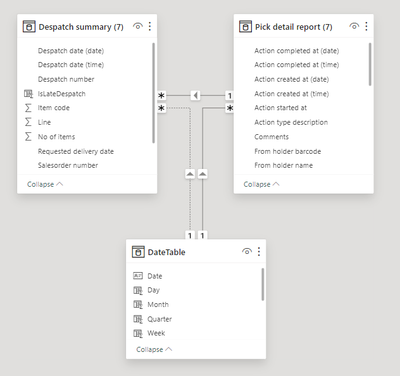
Hello, Amit
I appreciate your response.
As you suggested, I attempted to modify the measures, but nothing changed.
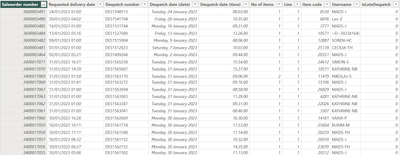
As a result, I have deleted the confidential information and included screenshots of the Power BI tables.
The "despatch summary" table is shown in the first image, and the remaining images are from the "pick detail report" table.
I hope I have given you what you asked for. If not, do let me know what you require.


- Mark as New
- Bookmark
- Subscribe
- Mute
- Subscribe to RSS Feed
- Permalink
- Report Inappropriate Content
@Anonymous , I Hope TotalOrdersReleased, TotalLateDespatches are measures. Try with this change
TotalOrdersReleased = CALCULATE(COUNTROWS('Pick detail report (7)'),Filter( 'Pick detail report (7)' 'Pick detail report (7)'[ReleasedAfterCutoff] = 0))
TotalLateDespatches = CALCULATE(COUNTROWS('Despatch summary (7)'), Filter('Despatch summary (7)', 'Despatch summary (7)'[IsLateDespatch] = 1) )
If this does not help
Can you share sample data and sample output in table format? Or a sample pbix after removing sensitive data.
- Mark as New
- Bookmark
- Subscribe
- Mute
- Subscribe to RSS Feed
- Permalink
- Report Inappropriate Content
I recently discovered that I can send you a PBIX file using WeTransfer, so here's the link: https://we.tl/t-9v0iIOeYvL
Helpful resources

Power BI Dataviz World Championships
The Power BI Data Visualization World Championships is back! Get ahead of the game and start preparing now!

Power BI Monthly Update - December 2025
Check out the December 2025 Power BI Holiday Recap!

FabCon Atlanta 2026
Join us at FabCon Atlanta, March 16-20, for the ultimate Fabric, Power BI, AI and SQL community-led event. Save $200 with code FABCOMM.

| User | Count |
|---|---|
| 41 | |
| 38 | |
| 36 | |
| 30 | |
| 28 |


| User | Count |
|---|---|
| 128 | |
| 88 | |
| 79 | |
| 67 | |
| 62 |


