Join us at FabCon Atlanta from March 16 - 20, 2026, for the ultimate Fabric, Power BI, AI and SQL community-led event. Save $200 with code FABCOMM.
Register now!Learn from the best! Meet the four finalists headed to the FINALS of the Power BI Dataviz World Championships! Register now
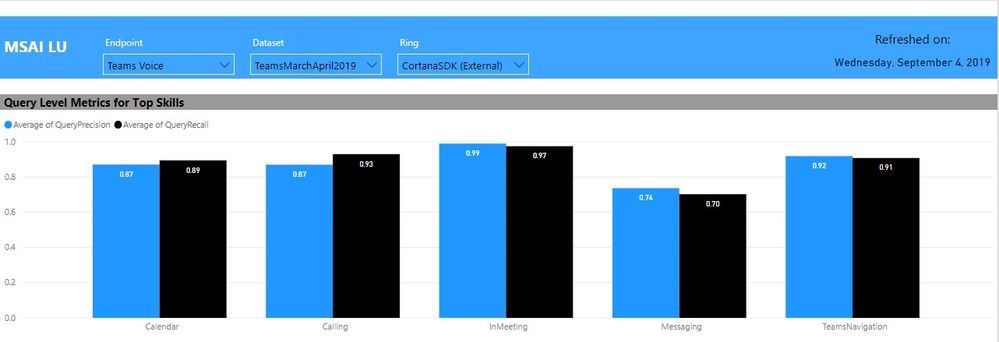
In my report, there are three categories by which the visuals can be filtered by: Endpoint, Dataset, and Ring and I have a slicer for each. Not all Endpoints have the same Datasets or Rings. For example, the Teams Voice Endpoint only has one Dataset and one Ring. The issue arises when a user selects one Endpoint, Dataset, and Ring, and tries to switch to an Endpoint for which the previously selected Dataset and/or Ring does not exist.
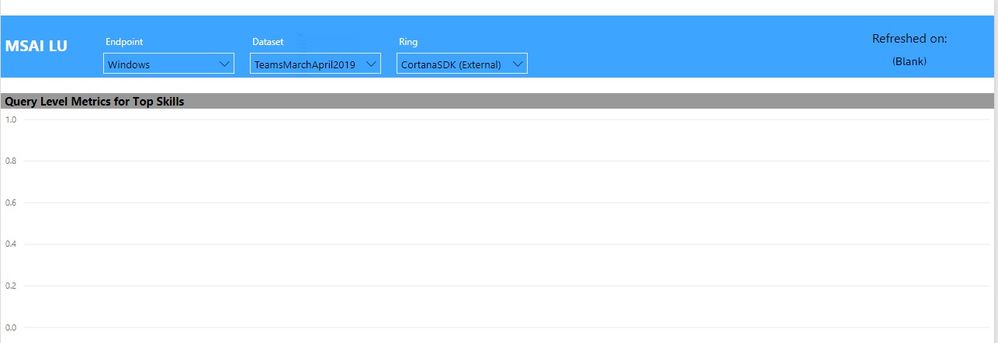
The visuals become blank because the previous Dataset and Ring is still selected. Is there a way to assign priority to the Endpoint slicer so that whenever a selection is changed there, the values in the other two categories are filtered accordingly and any previous values are automatically unselected? If not, should I be using a different slicer or is there a different way I should approach the problem?
Thanks!
Solved! Go to Solution.
Hi @apai ,
As you refer your problem as to do with the order the users select your slicers, you can try one of this workarounds:
Hierarchy Slicer (Custom visual) :https://appsource.microsoft.com/en-us/product/power-bi-visuals/WA104380820?tab=Overview
Another option is to create a measure that will return and error if the result is blank that alerts the user to select the other two options.
You can also add a hint or a order number to visually the users understand the order of the selection.
Just making some workaroudns, maybe they are not the best solution overall.
Regards,
MFelix
Regards
Miguel Félix
Proud to be a Super User!
Check out my blog: Power BI em PortuguêsHi @apai ,
As you refer your problem as to do with the order the users select your slicers, you can try one of this workarounds:
Hierarchy Slicer (Custom visual) :https://appsource.microsoft.com/en-us/product/power-bi-visuals/WA104380820?tab=Overview
Another option is to create a measure that will return and error if the result is blank that alerts the user to select the other two options.
You can also add a hint or a order number to visually the users understand the order of the selection.
Just making some workaroudns, maybe they are not the best solution overall.
Regards,
MFelix
Regards
Miguel Félix
Proud to be a Super User!
Check out my blog: Power BI em PortuguêsShare feedback directly with Fabric product managers, participate in targeted research studies and influence the Fabric roadmap.
Check out the February 2026 Power BI update to learn about new features.
| User | Count |
|---|---|
| 52 | |
| 51 | |
| 35 | |
| 15 | |
| 14 |
| User | Count |
|---|---|
| 92 | |
| 75 | |
| 41 | |
| 26 | |
| 25 |