Don't miss your chance to take the Fabric Data Engineer (DP-700) exam on us!
Learn moreThe FabCon + SQLCon recap series starts April 14th at 8am Pacific. If you’re tracking where AI is going inside Fabric, this first session is a can't miss. Register now
Hello All,
i have a situation where i must provide a slicer for month (the months are in specific order July-2019 to June-2020)
then when a month is selected i must show the previous all month’s data irrespective of year
Slicer
Slicer
If I Select October, I must show from July to October
year | Month | values |
2019 | July | 10 |
2019 | August | 50 |
2019 | September | 20 |
2019 | October | 65 |
If I Select January then I must show from July to January
year | Month | values |
2019 | July | 10 |
2019 | August | 50 |
2019 | September | 20 |
2019 | October | 65 |
2019 | November | 30 |
2019 | December | 45 |
2020 | January | 90 |
Solved! Go to Solution.
Hi @Anonymous ,
We can use a date table and create a measure to meet your requirement.
1. Create a date table based on your date, there is no relationship between two tables.
Date = ADDCOLUMNS(CALENDAR("2019/7/1","2020/6/1"),"year",YEAR([Date]),"Month_name",FORMAT([Date],"mmm"),"Month_number",MONTH([Date]))
2. Create a measure like this,
Measure =
var selected_ = SELECTEDVALUE('Date'[Month_name])
var Date_ = CALCULATE(MAX('Date'[Date]),FILTER('Date','Date'[Month_name]=selected_))
return
IF(ISBLANK(selected_),CALCULATE(SUM('Table'[Values])),CALCULATE(SUM('Table'[Values]),FILTER('Table', 'Table'[Date]<=Date_)))
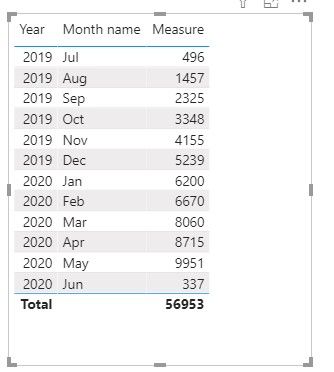
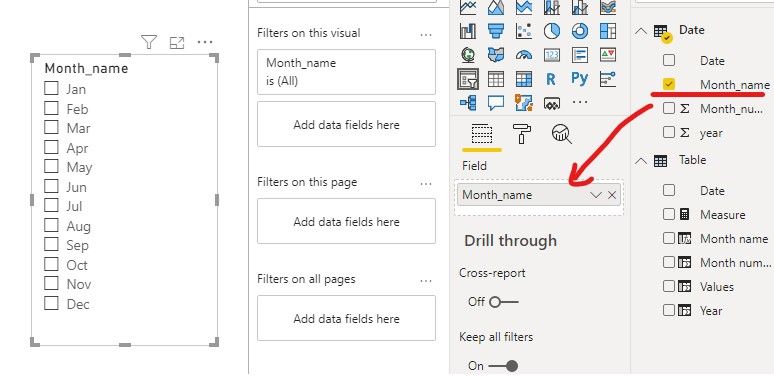
3. At last we need to add a month slicer based on Date[Month_name], and the result like this.
If it doesn’t meet your requirement, could you please show the exact expected result based on the table that you have shared?
BTW, pbix as attached.
Best regards,
Community Support Team _ zhenbw
If this post helps, then please consider Accept it as the solution to help the other members find it more quickly.
Hi @Anonymous ,
We can use a date table and create a measure to meet your requirement.
1. Create a date table based on your date, there is no relationship between two tables.
Date = ADDCOLUMNS(CALENDAR("2019/7/1","2020/6/1"),"year",YEAR([Date]),"Month_name",FORMAT([Date],"mmm"),"Month_number",MONTH([Date]))
2. Create a measure like this,
Measure =
var selected_ = SELECTEDVALUE('Date'[Month_name])
var Date_ = CALCULATE(MAX('Date'[Date]),FILTER('Date','Date'[Month_name]=selected_))
return
IF(ISBLANK(selected_),CALCULATE(SUM('Table'[Values])),CALCULATE(SUM('Table'[Values]),FILTER('Table', 'Table'[Date]<=Date_)))
3. At last we need to add a month slicer based on Date[Month_name], and the result like this.
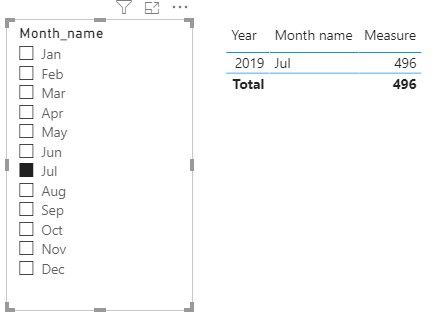
If it doesn’t meet your requirement, could you please show the exact expected result based on the table that you have shared?
BTW, pbix as attached.
Best regards,
Community Support Team _ zhenbw
If this post helps, then please consider Accept it as the solution to help the other members find it more quickly.
Hi there,
This is not working for me
1) i don’t have only 2019 and 2020 data i have multiple years
2) i have a fiscal year slicer which starts from July 2017 to June 2018, July 2018 to June 2019, July 2019 to June 2020
3) when i do the above measure i am getting an sum value which i don’t need
If you have recently started exploring Fabric, we'd love to hear how it's going. Your feedback can help with product improvements.
A new Power BI DataViz World Championship is coming this June! Don't miss out on submitting your entry.
Share feedback directly with Fabric product managers, participate in targeted research studies and influence the Fabric roadmap.
| User | Count |
|---|---|
| 53 | |
| 40 | |
| 37 | |
| 19 | |
| 18 |
| User | Count |
|---|---|
| 69 | |
| 68 | |
| 34 | |
| 33 | |
| 30 |