cancel
Showing results for 
Search instead for 
Did you mean: 

The Power BI Data Visualization World Championships is back! Get ahead of the game and start preparing now! Learn more

Reply
math2841
Regular Visitor

SelectRows function

Dear Power BI Experts,

In my Power BI report i would like to create relations between my different NAV queries, based on the global dimension.

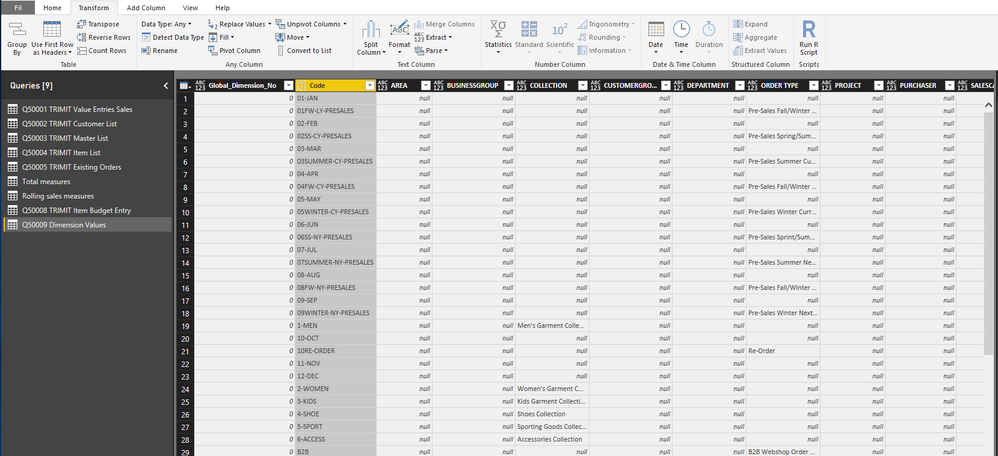
In order to avoid a many to many relation i created a query with my global dimensions as seen below.
Global Dimension table.png
I would like to create a table for each "global dimension no" as described in the following link:

https://www.linkedin.com/pulse/dealing-dimensions-hooking-power-bi-up-microsoft-marghi-cpa-cga


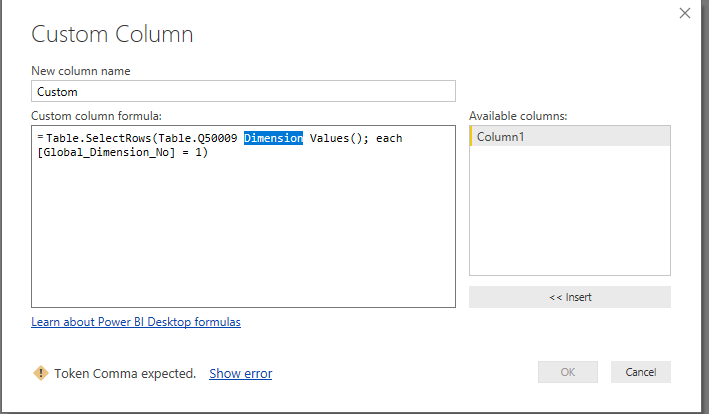
I tried to use SelectRows but im left with an error:
SelectRows Function.png

 I hope you can help me understand what im doing wrong and how i can accomplish my goal. 

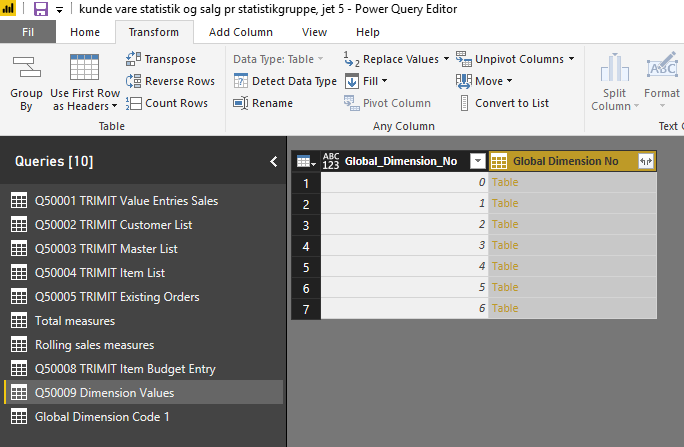
I also tried using group by, but it left me with the following table.
If i click on Table in the picture below, i will se my desired result but i do not have one table for each global dimension no. 

I hope you can help me.  


Group By function.png


2 REPLIES 2
v-yuta-msft
Community Support
Community Support

Hi math2841,


The syntax of table.selectrows seems to be wrong in your screenshot. You should follow the format like 

Table.SelectRows(table as table, condition as function) as table

Please refer to: https://msdn.microsoft.com/en-us/query-bi/m/table-selectrows


Regards,

Jimmy Tao

Anonymous
Not applicable

Thanks for the reply v-yuta-msft.
I found a workaround by using LOOKUP.

Helpful resources

Announcements
Power BI DataViz World Championships

Power BI Dataviz World Championships

The Power BI Data Visualization World Championships is back! Get ahead of the game and start preparing now!

December 2025 Power BI Update Carousel

Power BI Monthly Update - December 2025

Check out the December 2025 Power BI Holiday Recap!

FabCon Atlanta 2026 carousel

FabCon Atlanta 2026

Join us at FabCon Atlanta, March 16-20, for the ultimate Fabric, Power BI, AI and SQL community-led event. Save $200 with code FABCOMM.