cancel
Showing results for 
Search instead for 
Did you mean: 

The Power BI Data Visualization World Championships is back! Get ahead of the game and start preparing now! Learn more

Reply
Anonymous
Not applicable

Select latest date from the table in the slice

Hi Folks,

Thanks for addressing my query.

I need that my slicer will auto select the latest date from the drop down list. Is there any solutions??

Thanks,
Gaurav Jangra

1 ACCEPTED SOLUTION

@gauravjangra09 , That is where you need to have column like

Date Type = SWITCH(TRUE(),'Date'[Date]=max(Table[Date]),"Lastest Date" //Date equal to max of fact/table
,'Date'[Date]&"")

Share with Power BI Enthusiasts: Full Power BI Video (20 Hours) YouTube
Microsoft Fabric Series 60+ Videos YouTube
Microsoft Fabric Hindi End to End YouTube

View solution in original post

4 REPLIES 4
Anonymous
Not applicable

Hi @Anonymous 

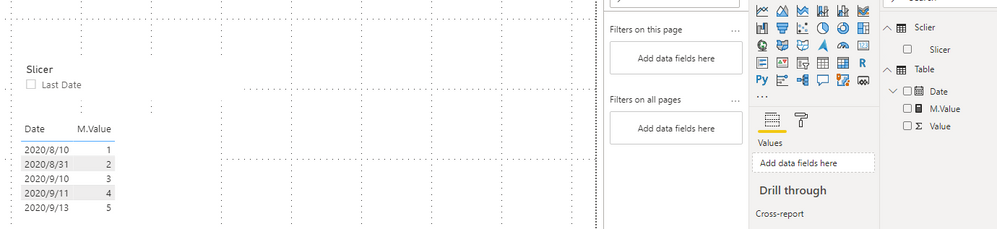
If you want to get the latest date by slicer, you can build a measure.

Due to I don't know your data model, I build a sample to have a test.

Measure:

M.Value = 
VAR _Value =
    SUM ( 'Table'[Value] )
VAR _LatestDate =
    MAXX ( ALL ( 'Table' ), 'Table'[Date] )
VAR _LatestValue =
    CALCULATE (
        SUM ( 'Table'[Value] ),
        FILTER ( 'Table', 'Table'[Date] = _LatestDate )
    )
RETURN
    IF ( ISFILTERED ( Sclier[Slicer] ), _LatestValue, _Value )

In table visual it will show all Dates as default and show the latest Date if you select the Slicer.

1.png

You can download the pbix file from this link: Select latest date from the table in the slicer


Best Regards,

Rico Zhou


If this post helps, then please consider Accept it as the solution to help the other members find it more quickly. 

amitchandak
Super User
Super User

@Anonymous , There no auto select option.


You have to use one of these tricks. Have a column like this and select the value. Sort this column on date column


new Columns
Date Type = SWITCH(TRUE(),'Date'[Date]=TODAY(),"Today"
,'Date'[Date]=TODAY()-1,"Yesterday"
,'Date'[Date]&"")


Date Type = SWITCH(TRUE(),'Date'[Date]=Max('Table'[Date]),"Lastest Date"
,'Date'[Date]&"")

Share with Power BI Enthusiasts: Full Power BI Video (20 Hours) YouTube
Microsoft Fabric Series 60+ Videos YouTube
Microsoft Fabric Hindi End to End YouTube
Anonymous
Not applicable

Hi @

Thanks for your reply.

This case is acceptable when data is updating regularly what should i do when i didn't have the latest data.
let suppose in my table i have latest record is for 13th September. then how i will address this.

Thanks,
Gaurav Jangra

@gauravjangra09 , That is where you need to have column like

Date Type = SWITCH(TRUE(),'Date'[Date]=max(Table[Date]),"Lastest Date" //Date equal to max of fact/table
,'Date'[Date]&"")

Share with Power BI Enthusiasts: Full Power BI Video (20 Hours) YouTube
Microsoft Fabric Series 60+ Videos YouTube
Microsoft Fabric Hindi End to End YouTube

Helpful resources

Announcements
Power BI DataViz World Championships

Power BI Dataviz World Championships

The Power BI Data Visualization World Championships is back! Get ahead of the game and start preparing now!

November Power BI Update Carousel

Power BI Monthly Update - November 2025

Check out the November 2025 Power BI update to learn about new features.

FabCon Atlanta 2026 carousel

FabCon Atlanta 2026

Join us at FabCon Atlanta, March 16-20, for the ultimate Fabric, Power BI, AI and SQL community-led event. Save $200 with code FABCOMM.