Join us at FabCon Atlanta from March 16 - 20, 2026, for the ultimate Fabric, Power BI, AI and SQL community-led event. Save $200 with code FABCOMM.
Register now!The Power BI Data Visualization World Championships is back! Get ahead of the game and start preparing now! Learn more
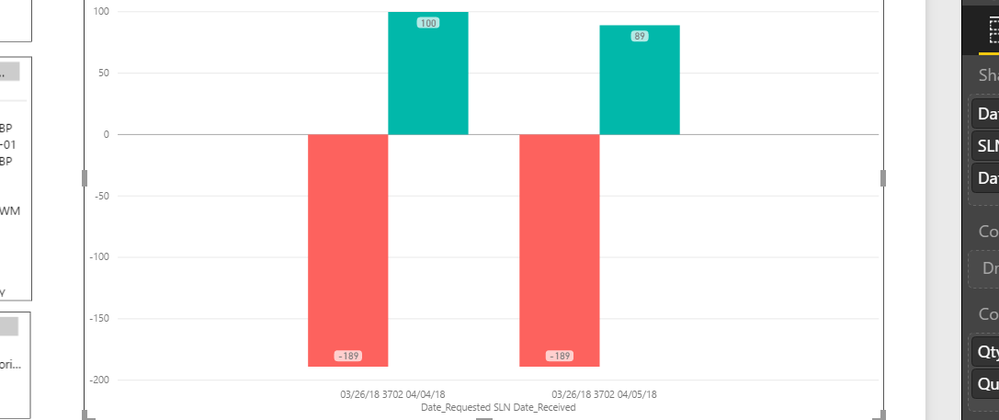
I have a data set as below
ID1 ID2 ID3 ReqQty RecvQty Datereq DateRecv
001 aa 123 189 100 03/26/18 04/04/18
001 aa 123 189 89 03/26/18 04/05/18
There was request placed on 03/26 for qty 500, and was delivered in 2 phases 200 on 04/04 and 300 on 04/05. In the bar chart I want show the recvqty and reqqty with dates as in the chart. But I want to to show the req qty only once. Because requested is just 500 and for that we received 2 different deliveries. Mine shows twice.... I just want a single RED bar of 189.
Do not repeat 189 in both the rows. Just have it in the 1st colum.
Change the data in database you mean? I do not want to do that,, Is there anything that we can do in POWer BI ?
You may try adding a calculated column and take a look at Tutorial: Waterfall charts in Power BI.
The Power BI Data Visualization World Championships is back! Get ahead of the game and start preparing now!
| User | Count |
|---|---|
| 38 | |
| 37 | |
| 33 | |
| 32 | |
| 29 |
| User | Count |
|---|---|
| 132 | |
| 88 | |
| 82 | |
| 68 | |
| 64 |