cancel
Showing results for 
Search instead for 
Did you mean: 

The Power BI Data Visualization World Championships is back! Get ahead of the game and start preparing now! Learn more

Reply
patricia_csf
Regular Visitor

Select a group of users among a bigger data

Hi, 

I have a table, with 100 users that travelled 1,000 trips (10 trips on average per person).

Among them, 10 went to New York, e.g. 30 trips (3 on average per person).

I can select both data in the table. So far, so good.


What I need help is to select, among ONLY these 10 users that travelled to New York (30 trips), how many trips they also had to other places and which places were that. 

E.g.

User 1 went 10 times to NY, and also 3 times to California

User 2 went 1 time to NY, and also 30 times to China

User 3 went 5 times to NY, and also 1x to California and 1x to China

User 4 went 2 times to NY, and 20 times to Brazil...


Thx in advance.

1 ACCEPTED SOLUTION
v-jingzhang
Community Support
Community Support

Hi @patricia_csf


I used the following sample data to realize it, please refer to the steps below and let me know if it helps.
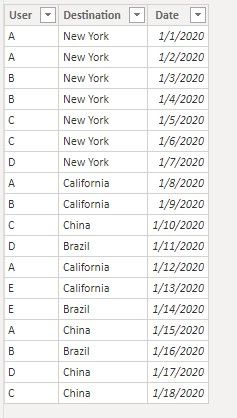
112708.jpg


First create a new table with the following DAX codes to filter the trips of those users who travelled to NY.

NY_User_Trips =
FILTER (
    Trips,
    Trips[User]
        IN (
            SUMMARIZE ( FILTER ( Trips, Trips[Destination] = "New York" ), Trips[User] )
        )
)
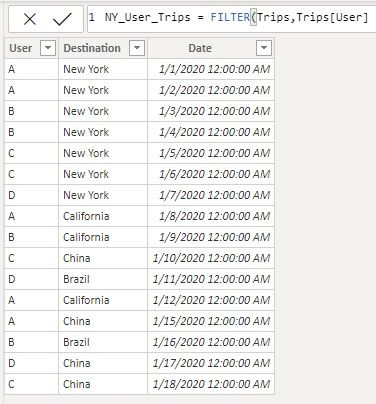
 112706.jpg


Then use a Matrix visual, put User as Rows, Destination as Columns, Count of Destination as Values (click the drop-down arrow to change Destination's aggregate type into Count) from the new table.
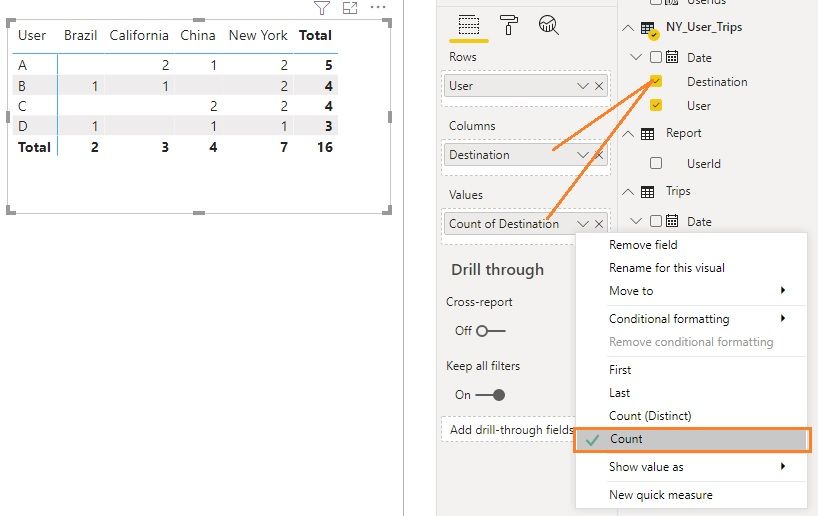
112707.jpg


If you don't want to show NY trips, you can apply a Destination filter on the visual with NY unselected. Otherwise, you can also modify the new table DAX codes into:

NY_User_Trips =
FILTER (
    Trips,
    Trips[User]
        IN (
            SUMMARIZE ( FILTER ( Trips, Trips[Destination] = "New York" ), Trips[User] )
        )
            && Trips[Destination] <> "New York"
)


Community Support Team _ Jing Zhang
If this post helps, please consider Accept it as the solution to help other members find it.

View solution in original post

2 REPLIES 2
v-jingzhang
Community Support
Community Support

Hi @patricia_csf


I used the following sample data to realize it, please refer to the steps below and let me know if it helps.

112708.jpg


First create a new table with the following DAX codes to filter the trips of those users who travelled to NY.

NY_User_Trips =
FILTER (
    Trips,
    Trips[User]
        IN (
            SUMMARIZE ( FILTER ( Trips, Trips[Destination] = "New York" ), Trips[User] )
        )
)

 112706.jpg


Then use a Matrix visual, put User as Rows, Destination as Columns, Count of Destination as Values (click the drop-down arrow to change Destination's aggregate type into Count) from the new table.

112707.jpg


If you don't want to show NY trips, you can apply a Destination filter on the visual with NY unselected. Otherwise, you can also modify the new table DAX codes into:

NY_User_Trips =
FILTER (
    Trips,
    Trips[User]
        IN (
            SUMMARIZE ( FILTER ( Trips, Trips[Destination] = "New York" ), Trips[User] )
        )
            && Trips[Destination] <> "New York"
)


Community Support Team _ Jing Zhang
If this post helps, please consider Accept it as the solution to help other members find it.

amitchandak
Super User
Super User

@patricia_csf , Try a measure like

new measure =
var _usr = summarize(filter(Table, Table[City] = "New York" ), Table[User])
return
calculate(count(*) , filter(Table, Table[City] <> "New York" && Table[User] in _usr ))

Share with Power BI Enthusiasts: Full Power BI Video (20 Hours) YouTube
Microsoft Fabric Series 60+ Videos YouTube
Microsoft Fabric Hindi End to End YouTube

Helpful resources

Announcements
Power BI DataViz World Championships

Power BI Dataviz World Championships

The Power BI Data Visualization World Championships is back! Get ahead of the game and start preparing now!

December 2025 Power BI Update Carousel

Power BI Monthly Update - December 2025

Check out the December 2025 Power BI Holiday Recap!

FabCon Atlanta 2026 carousel

FabCon Atlanta 2026

Join us at FabCon Atlanta, March 16-20, for the ultimate Fabric, Power BI, AI and SQL community-led event. Save $200 with code FABCOMM.