cancel
Showing results for 
Search instead for 
Did you mean: 

The FabCon + SQLCon recap series starts April 14th at 8am Pacific. If you’re tracking where AI is going inside Fabric, this first session is a can't miss. Register now

Reply
Harinihemanth06
Microsoft Employee
Microsoft Employee

Segregating single Column Data into different columns

Need help with Segregating single Column Data into different columns

DateResourceTypeCharacteristic
12-11-2017HarSkillEnglish
13-11-2017RitSkillHindi
14-11-2017KalSkillEngilsh
12-11-2017kalCertificationA103
13-11-2017HarCertificationA103
14-11-2017RitCertificationA400
15-11-2017sujCertificationA400
16-11-2017hemSkillHindi
17-11-2017sujskillTamil
18-11-2017RitQualificationVLIT
22-11-2017sujQualificationLIT
23-11-2017hemQualificationVLIT
24-11-2017vinSkillTamil
25-11-2017vinCertificationA200
26-11-2017kalQualificationLIT
27-11-2017cheCertificationA200
28-11-2017cheQualificationVLIT
29-11-2017sunSkillHindi
30-11-2017sunCertificationA103
01-12-2017manCertificationA400
02-12-2017sowCertificationA200


I want Characteristic to be seperated according to type. i.e I want 3 slicers for Certification and only corresponding Characteristic ,Skill only Corresponding Characteristic and Qualification And Characteristic .

For example if I have select "Certification" as "A400" it should show number of resources and then from "skill "if i Select - "Hindi" then the resources should be further filtered.


Any input will be helpfull

1 ACCEPTED SOLUTION

Hi @Harinihemanth06 ,

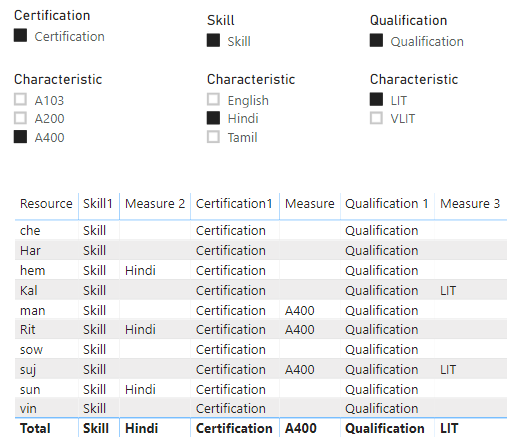
For your requirement, you need to create multiple tables as slicers. If still use the original column as slicers, the values will be always filtered by other slicers. 

The following formulas just for one type. The other types are same as them. For more details, you could reference my sample.

  • For type of Skill

1. Create two new irrelevant tables as slicer.

Characteristic of Skill = CALCULATETABLE(VALUES('Table'[Characteristic]),FILTER('Table','Table'[Type]= "Skill"))

4.PNGCreate manuallyCreate manually

2. Create measures.

Skill1 = SELECTEDVALUE(Skill[Skill])

Measure 2 = 
VAR a =
    CALCULATE (
        MAX ( 'Table'[Characteristic] ),
        FILTER ( 'Table', 'Table'[Type] = [Skill1] )
    )
VAR b =
    CALCULATE (
        MAX ( 'Table'[Characteristic] ),
        FILTER (
            'Table',
            'Table'[Characteristic]
                = SELECTEDVALUE ( 'Characteristic of Skill'[Characteristic] )
        )
    )
RETURN
    IF (
        ISFILTERED ( Skill[Skill] ),
        IF (
            ISFILTERED ( 'Characteristic of Skill'[Characteristic] ),
            b,
            a
        ),
   b
    )

2.PNG

Best Regards,

Xue Ding

If this post helps, then please consider Accept it as the solution to help the other members find it more quickly.

Best Regards,
Xue Ding
If this post helps, then please consider Accept it as the solution to help the other members find it more quickly.

View solution in original post

5 REPLIES 5
rajulshah
Resident Rockstar
Resident Rockstar

Hello @Harinihemanth06 ,


Please provide the sample result of the data that you posted.

Hi @rajulshah 


Am looking similar result


ResourceTpecolum1column2column3column4column5
HarSkillEnglishCertificationA103QualificationNill
RitSkillHindiCertificationa400QualificationVLIT
KalSkillEnglishCertificationa400QualificationLIT
SujSkillTamilCertificationA400QualificationLIT
vinSkillTamilCertificationa200Qualificationnill


My requirement is that I need to have multislicer selection slicer on Certification,skill and Qualification and three different slicers for characteristic selection 

Hi @Harinihemanth06 ,

For your requirement, you need to create multiple tables as slicers. If still use the original column as slicers, the values will be always filtered by other slicers. 

The following formulas just for one type. The other types are same as them. For more details, you could reference my sample.

  • For type of Skill

1. Create two new irrelevant tables as slicer.

Characteristic of Skill = CALCULATETABLE(VALUES('Table'[Characteristic]),FILTER('Table','Table'[Type]= "Skill"))

4.PNGCreate manuallyCreate manually

2. Create measures.

Skill1 = SELECTEDVALUE(Skill[Skill])

Measure 2 = 
VAR a =
    CALCULATE (
        MAX ( 'Table'[Characteristic] ),
        FILTER ( 'Table', 'Table'[Type] = [Skill1] )
    )
VAR b =
    CALCULATE (
        MAX ( 'Table'[Characteristic] ),
        FILTER (
            'Table',
            'Table'[Characteristic]
                = SELECTEDVALUE ( 'Characteristic of Skill'[Characteristic] )
        )
    )
RETURN
    IF (
        ISFILTERED ( Skill[Skill] ),
        IF (
            ISFILTERED ( 'Characteristic of Skill'[Characteristic] ),
            b,
            a
        ),
   b
    )

2.PNG

Best Regards,

Xue Ding

If this post helps, then please consider Accept it as the solution to help the other members find it more quickly.

Best Regards,
Xue Ding
If this post helps, then please consider Accept it as the solution to help the other members find it more quickly.

@v-xuding-msft Thank you for the solution

Hi @Harinihemanth06 

It's my pleasure to help you resolve this.😊


Best Regards,
Xue Ding

Best Regards,
Xue Ding
If this post helps, then please consider Accept it as the solution to help the other members find it more quickly.

Helpful resources

Announcements
New to Fabric survey Carousel

New to Fabric Survey

If you have recently started exploring Fabric, we'd love to hear how it's going. Your feedback can help with product improvements.

Power BI DataViz World Championships carousel

Power BI DataViz World Championships - June 2026

A new Power BI DataViz World Championship is coming this June! Don't miss out on submitting your entry.

Join our Fabric User Panel

Join our Fabric User Panel

Share feedback directly with Fabric product managers, participate in targeted research studies and influence the Fabric roadmap.

March Power BI Update Carousel

Power BI Community Update - March 2026

Check out the March 2026 Power BI update to learn about new features.