We've captured the moments from FabCon & SQLCon that everyone is talking about, and we are bringing them to the community, live and on-demand. Starts on April 14th. Register now
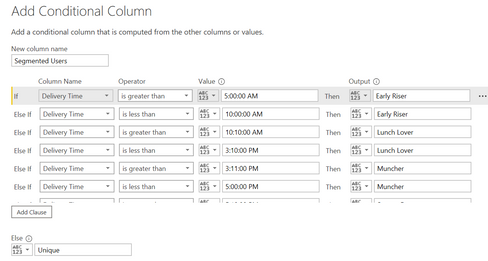
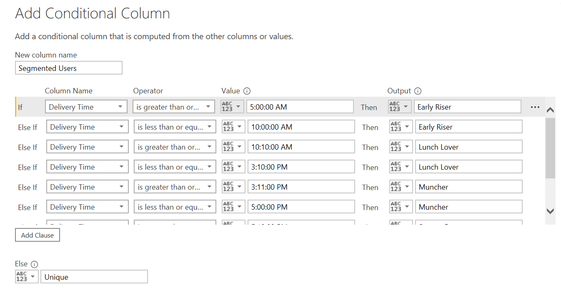
Hi, I would like to segment users based on Delivery Time. However, when I run this condition column query, I am ending up with only "Early riser" and none of the other categories.
Is there something that I am missing?
Thanks
Solved! Go to Solution.
It is evaluating each condition separately and all your rows are likely > 5 AM so get marked as early riser. You need to nest yours condition together. In the Formula Bar (turn it on in Options if not visible) modify your step with 'and' in between to look like this.
= Table.AddColumn(#"Changed Type", "Custom", each if [Column1] > #time(5, 0, 0) and [Column1] < #time(10, 0, 0) then "Early Riser" else if [Column1] >= #time(10, 0, 0) and [Column1] < #time(15, 0, 0) then "Lunch Person" else "Other")
Pat
To learn more about Power BI, follow me on Twitter or subscribe on YouTube.
It is evaluating each condition separately and all your rows are likely > 5 AM so get marked as early riser. You need to nest yours condition together. In the Formula Bar (turn it on in Options if not visible) modify your step with 'and' in between to look like this.
= Table.AddColumn(#"Changed Type", "Custom", each if [Column1] > #time(5, 0, 0) and [Column1] < #time(10, 0, 0) then "Early Riser" else if [Column1] >= #time(10, 0, 0) and [Column1] < #time(15, 0, 0) then "Lunch Person" else "Other")
Pat
To learn more about Power BI, follow me on Twitter or subscribe on YouTube.
HI @saipawar ,
I think you need to give a condition like >= and <= to get something.
In your case you have conditions which have open boundaries as they just look at greater than/less than/etc.
you will have to frame your IF-ELSE with greater-than and less-than conditions for each category.
for example:
IF([column] >= 0 && [column] <= 10, "Value1",
IF([column] >10 && [column] <= 20, "Value2", "Value3"))
You can achieve this by creating a Custom column in Power Query or using DAX to create a calculated column.
Thanks,
Pragati
Hi @saipawar ,
I don't see a multiple condition for you first scenario. You haven't done what I mentioned above. Also you can do it using this Conditional Column in Power Query.
You will have to create a custom column and then write a IF-ELSE loop. Also, you will have to give a proper order to your conditions.
If you can share sample data as a file, we can help you frane the IF-ELSE condition.
Thanks,
Pragati
If you have recently started exploring Fabric, we'd love to hear how it's going. Your feedback can help with product improvements.
A new Power BI DataViz World Championship is coming this June! Don't miss out on submitting your entry.
Share feedback directly with Fabric product managers, participate in targeted research studies and influence the Fabric roadmap.
| User | Count |
|---|---|
| 57 | |
| 38 | |
| 33 | |
| 19 | |
| 16 |
| User | Count |
|---|---|
| 67 | |
| 66 | |
| 40 | |
| 34 | |
| 25 |