
Join us at FabCon Atlanta from March 16 - 20, 2026, for the ultimate Fabric, Power BI, AI and SQL community-led event. Save $200 with code FABCOMM.
Register now!Learn from the best! Meet the four finalists headed to the FINALS of the Power BI Dataviz World Championships! Register now
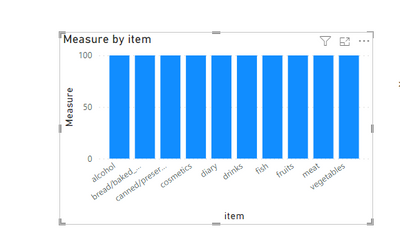
Even I have relationship between tables but visual shows same value.
why it happens?
measure counts age from customers table
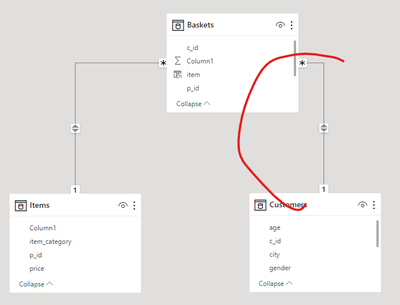
Can you show the relationship?
It seems like the problem is the direction of the filters.
Hello @Analitika ,
There's no relationship between the item table and the table that has the value you're having in the measure.
If I answered your question, please mark my post as solution, Appreciate your Kudos 👍
Follow me on Linkedin
Vote for my Community Mobile App Idea 💡
Proud to be a Super User! | |
Ok but I made related column in baskets.
Measure equal countscolumn from customers.
So customer has relationship with baskets table.
in the measure use the count of cID from the basket table.
If I answered your question, please mark my post as solution, Appreciate your Kudos 👍
Follow me on Linkedin
Vote for my Community Mobile App Idea 💡
Proud to be a Super User! | |
But how use customers number then?
Share feedback directly with Fabric product managers, participate in targeted research studies and influence the Fabric roadmap.
Check out the February 2026 Power BI update to learn about new features.
| User | Count |
|---|---|
| 53 | |
| 51 | |
| 36 | |
| 15 | |
| 14 |
| User | Count |
|---|---|
| 92 | |
| 75 | |
| 41 | |
| 26 | |
| 25 |