Join us at FabCon Atlanta from March 16 - 20, 2026, for the ultimate Fabric, Power BI, AI and SQL community-led event. Save $200 with code FABCOMM.
Register now!The Power BI Data Visualization World Championships is back! Get ahead of the game and start preparing now! Learn more
Hi,
I am getting below error
Cannot convert value '04-OCT-18 02:55:46.000000000 PM' of type Text to type Date.
and I am using below Dax expression:
Gateway_Time_Diff = DATEDIFF('Test'[JMS_DELIVERED_DATE_TIME], 'Test'[FIRST_TOUCH_DATE_TIME], SECOND)
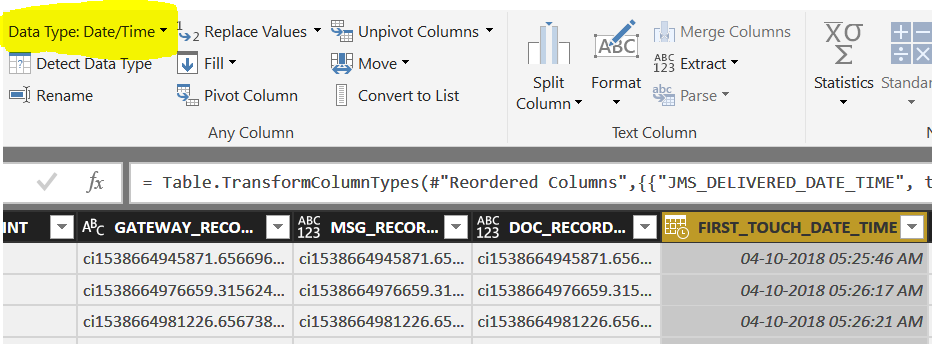
but when I am seleting a column in query editor it says that the column data type is Date/Time:
So what approach should I take for this to gate seconds between 2 date?
hi, @Anonymous
DATEDIFF Function is dax function and in the query editor it needs M language,
In query editor you can do these achieve your requirement
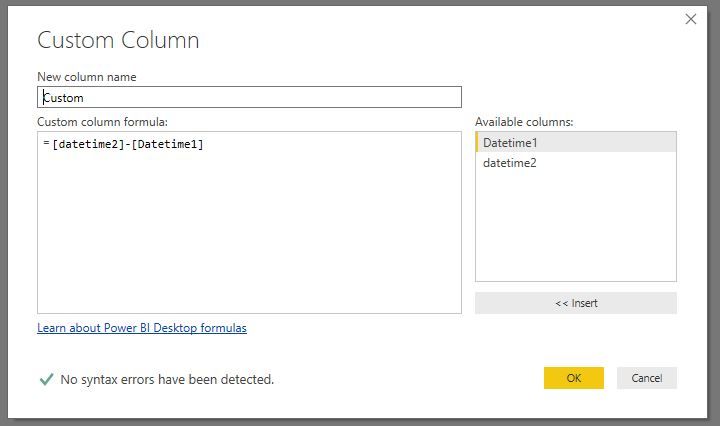
Step2:
Add a custom column that two datetime column are directly subtracted
Step2:
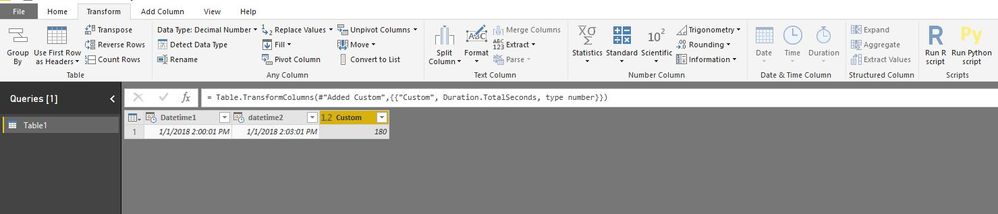
Select the result column then click Transform->date&time column->Duration->Total seconds
Result:
And the modeling process
you could create a calculate column by DATEDIFF Function
calculate column = DATEDIFF(Table1[Datetime1],Table1[datetime2],SECOND)
Best Regards,
Lin
The Power BI Data Visualization World Championships is back! Get ahead of the game and start preparing now!
| User | Count |
|---|---|
| 56 | |
| 45 | |
| 35 | |
| 34 | |
| 21 |
| User | Count |
|---|---|
| 140 | |
| 121 | |
| 100 | |
| 80 | |
| 57 |