Join us at FabCon Atlanta from March 16 - 20, 2026, for the ultimate Fabric, Power BI, AI and SQL community-led event. Save $200 with code FABCOMM.
Register now!The Power BI Data Visualization World Championships is back! Get ahead of the game and start preparing now! Learn more
Hi All
I have a simple IF statement that works to display an image URL when conditions are met, but I'd like it to evaluate only in the context of THIS calendar month. At the moment it either rolls up the result for all months in my table or I can get it to display direcrly in a table with each month represented.
It will let me have a second filter but it's not working.
Any ideas?
Hi @Faye1901,
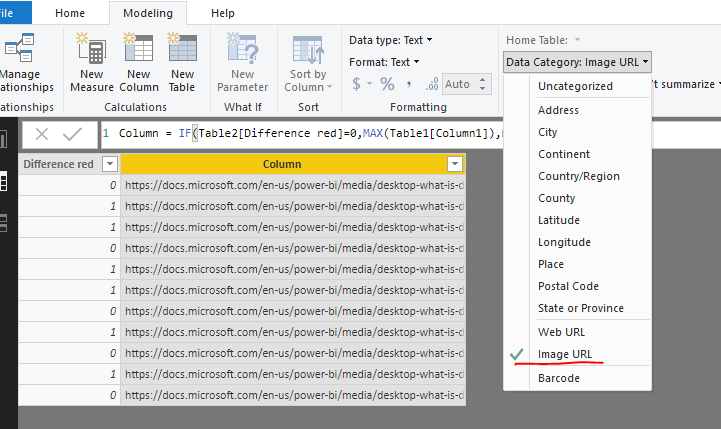
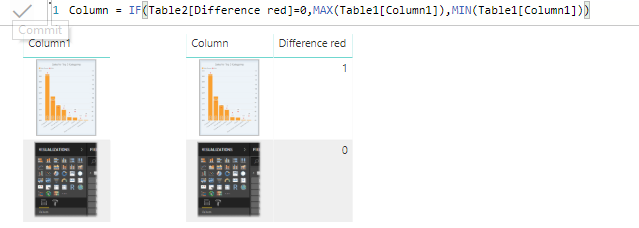
Here I made a test by creating a caluclate column.
Column = IF(Table2[Difference red]=0,MAX(Table1[Column1]),MIN(Table1[Column1]))
Then change the column to Web URL.
Regards,
Frank
Thanks for this. I've realised that a calculated column is the answer for sure - so I'm back to the drawing board.
I've now:
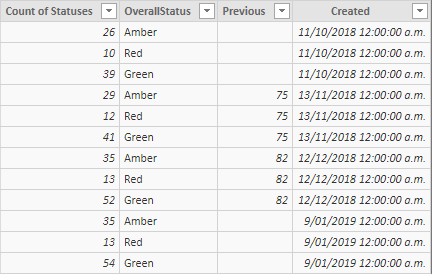
1. Created a summary table (so I don't need all those measures) using:
The Power BI Data Visualization World Championships is back! Get ahead of the game and start preparing now!
| User | Count |
|---|---|
| 40 | |
| 37 | |
| 35 | |
| 34 | |
| 28 |
| User | Count |
|---|---|
| 136 | |
| 99 | |
| 73 | |
| 66 | |
| 65 |