FabCon is coming to Atlanta
Join us at FabCon Atlanta from March 16 - 20, 2026, for the ultimate Fabric, Power BI, AI and SQL community-led event. Save $200 with code FABCOMM.
Register now!- Power BI forums
- Get Help with Power BI
- Desktop
- Service
- Report Server
- Power Query
- Mobile Apps
- Developer
- DAX Commands and Tips
- Custom Visuals Development Discussion
- Health and Life Sciences
- Power BI Spanish forums
- Translated Spanish Desktop
- Training and Consulting
- Instructor Led Training
- Dashboard in a Day for Women, by Women
- Galleries
- Data Stories Gallery
- Themes Gallery
- Contests Gallery
- QuickViz Gallery
- Quick Measures Gallery
- Visual Calculations Gallery
- Notebook Gallery
- Translytical Task Flow Gallery
- TMDL Gallery
- R Script Showcase
- Webinars and Video Gallery
- Ideas
- Custom Visuals Ideas (read-only)
- Issues
- Issues
- Events
- Upcoming Events
Get Fabric Certified for FREE during Fabric Data Days. Don't miss your chance! Request now
- Power BI forums
- Forums
- Get Help with Power BI
- Desktop
- Re: Second to last non blank value in an array?
- Subscribe to RSS Feed
- Mark Topic as New
- Mark Topic as Read
- Float this Topic for Current User
- Bookmark
- Subscribe
- Printer Friendly Page

- Mark as New
- Bookmark
- Subscribe
- Mute
- Subscribe to RSS Feed
- Permalink
- Report Inappropriate Content
Second to last non blank value in an array?
I have a chart with employees and reporting relationships and am trying to do some analysis by the VP of each department. My data looks like this:
Department Employee First Manager Second Manager Third Manager Fourth Manager
Dept 1 Employee 1 Employee 2 Employee 3 VP1 President
Dept 1 Employee 2 Employee 3 VP 1 President
Dept 1 VP 1 President
Dept 2 Employee 4 Employee 5 Employee 6 VP 2 President
Dept 2 Employee 5 Employee 6 VP 2 President
Dept 2 Employee 6 VP 2 President
Dept 2 VP 2 President
I want to end up with this:
Dept VP
Dept 1 VP1
Dept 2 VP2
Please help and thanks!
Solved! Go to Solution.


- Mark as New
- Bookmark
- Subscribe
- Mute
- Subscribe to RSS Feed
- Permalink
- Report Inappropriate Content
Could try a big nested if, something like:
if([fourth manager]=null,(similar logic checking the third manager),third manager)
It'll look at each column in turn, and when it finds one that isn't blank, returns the previous column

- Mark as New
- Bookmark
- Subscribe
- Mute
- Subscribe to RSS Feed
- Permalink
- Report Inappropriate Content
Hi @AGuero
In the query editor, could you filter the First Manager column=President? That should give you the VP of that department as the only employee in the department. To get to your desired result just delete the other columns an Rename the employee column to VP.
- Mark as New
- Bookmark
- Subscribe
- Mute
- Subscribe to RSS Feed
- Permalink
- Report Inappropriate Content
MarkS,
That would work in my simple example, but in reality there are cases where an employee is in a different department than his/her VP.


- Mark as New
- Bookmark
- Subscribe
- Mute
- Subscribe to RSS Feed
- Permalink
- Report Inappropriate Content
Hi @AGuero
How about a DAX Measure
Dept_VP =
LASTNONBLANK ( VALUES ( TableName[Employee] ), TableName[Employee] )
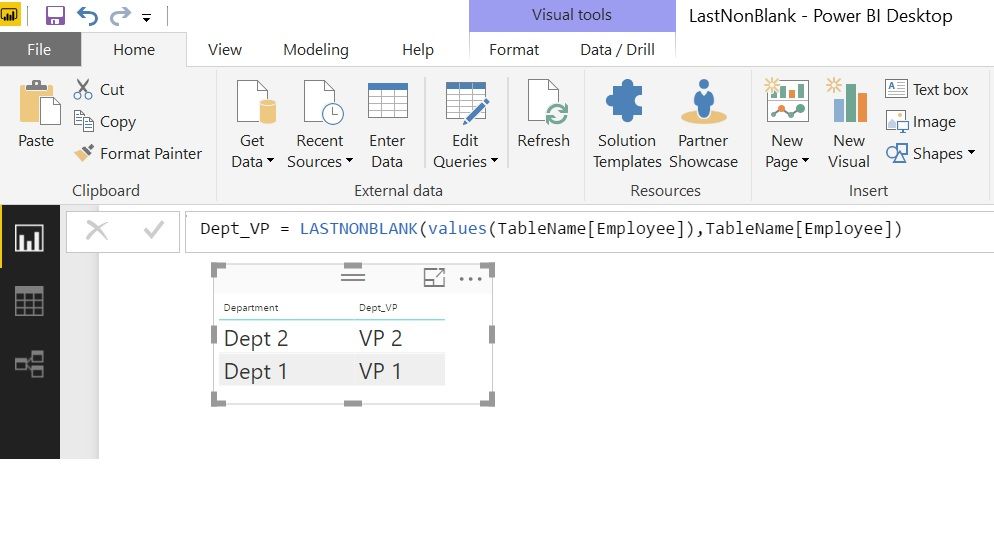
Regards
Zubair
Please try my custom visuals
- Mark as New
- Bookmark
- Subscribe
- Mute
- Subscribe to RSS Feed
- Permalink
- Report Inappropriate Content
Thanks Everyone!
I wrote a long, nexted IF statement that worked
IF(Table[Fourth Level Manager]<>"" && Table[Fourth Level Manager] <> "President", Table[Fourth Level Manager], IF(Table[Third Level Manager]<>""&&Table[Third Level Manager]<>"President",Table[Third Level Manager],IF......

- Mark as New
- Bookmark
- Subscribe
- Mute
- Subscribe to RSS Feed
- Permalink
- Report Inappropriate Content
In Power Query, just select the rows where First Manager <> null and Second Manager = null
let
    Source = Table1,
    #"Filtered Rows" = Table.SelectRows(Source, each [First Manager] <> null and [Second Manager] = null),
    #"Removed Other Columns" = Table.SelectColumns(#"Filtered Rows",{"Department", "Employee"}),
    #"Renamed Columns" = Table.RenameColumns(#"Removed Other Columns",{{"Employee", "VP"}})
in
    #"Renamed Columns"


- Mark as New
- Bookmark
- Subscribe
- Mute
- Subscribe to RSS Feed
- Permalink
- Report Inappropriate Content
Hi @AGuero,
You need to use Unpivot and then use Group by functions:
Unpivot and Group By Functions in Power BI Desktop
Hope this helps.
Regards
Abduvali
- Mark as New
- Bookmark
- Subscribe
- Mute
- Subscribe to RSS Feed
- Permalink
- Report Inappropriate Content
Could try a big nested if, something like:
if([fourth manager]=null,(similar logic checking the third manager),third manager)
It'll look at each column in turn, and when it finds one that isn't blank, returns the previous column

Helpful resources

Power BI Monthly Update - November 2025
Check out the November 2025 Power BI update to learn about new features.

Fabric Data Days
Advance your Data & AI career with 50 days of live learning, contests, hands-on challenges, study groups & certifications and more!

FabCon Atlanta 2026
Join us at FabCon Atlanta, March 16-20, for the ultimate Fabric, Power BI, AI and SQL community-led event. Save $200 with code FABCOMM.


| User | Count |
|---|---|
| 104 | |
| 81 | |
| 66 | |
| 50 | |
| 45 |


