cancel
Showing results for 
Search instead for 
Did you mean: 

The Power BI Data Visualization World Championships is back! Get ahead of the game and start preparing now! Learn more

Reply
Anonymous
Not applicable

Search Box

I need to create a search bar on power bi.

The user inputs ID, which filters a table viz I have created.

The search bar must not have a drop down feature. 

The result should only display table values for the ID typed in.

If no ID is typed in, the table must remain EMPTY.

I have tried using slicer and text filter add in.

However, when cleared, the entire table contents are visible.


2 ACCEPTED SOLUTIONS
Anonymous
Not applicable

You could use Bookmarks to save a version of report with blank table. WHen the Clear button is pressed, it goes to the bookmark.
Create report bookmarks in Power BI to share insights and build stories - Power BI | Microsoft Learn
Mastering Power BI Bookmarks - YouTube


View solution in original post

Anonymous
Not applicable

Hi @Anonymous ,

You might try the what-if parameter.
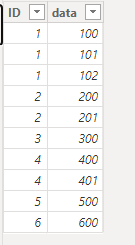
Here is my sample data:

vjunyantmsft_0-1701841775305.png

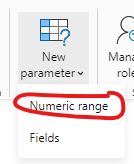
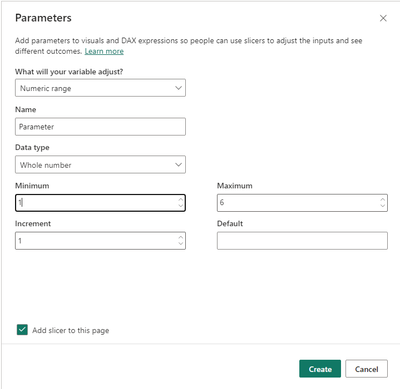
I create a What-if parameter here:

vjunyantmsft_2-1701841849543.png

vjunyantmsft_1-1701841819444.png

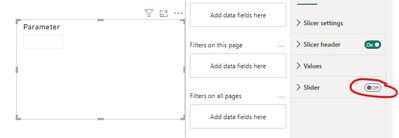
Close here and the slicer will only have a search bar:

vjunyantmsft_3-1701841935764.png

Then use the DAX below to create a new measure in the data table:

SelectedData = 
IF(
    SELECTEDVALUE('Table'[ID], 0) = 'Parameter'[Parameter Value],
    1,
    0
)

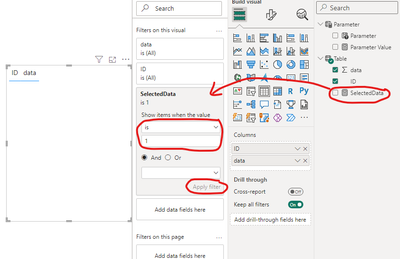
Apply 'Filters on this visual' as shown below:

vjunyantmsft_4-1701842117356.png

The final result is shown below:
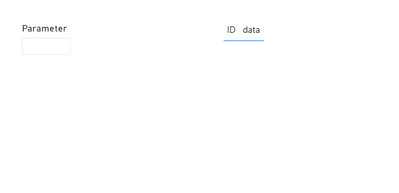
Without input:

vjunyantmsft_5-1701842183811.png

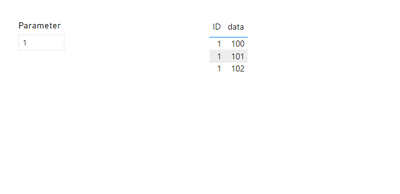
Input 1:

vjunyantmsft_6-1701842212674.png

Best Regards,
Dino Tao
If this post helps, then please consider Accept it as the solution to help the other members find it more quickly.


View solution in original post

2 REPLIES 2
Anonymous
Not applicable

Hi @Anonymous ,

You might try the what-if parameter.
Here is my sample data:

vjunyantmsft_0-1701841775305.png

I create a What-if parameter here:

vjunyantmsft_2-1701841849543.png

vjunyantmsft_1-1701841819444.png

Close here and the slicer will only have a search bar:

vjunyantmsft_3-1701841935764.png

Then use the DAX below to create a new measure in the data table:

SelectedData = 
IF(
    SELECTEDVALUE('Table'[ID], 0) = 'Parameter'[Parameter Value],
    1,
    0
)

Apply 'Filters on this visual' as shown below:

vjunyantmsft_4-1701842117356.png

The final result is shown below:
Without input:

vjunyantmsft_5-1701842183811.png

Input 1:

vjunyantmsft_6-1701842212674.png

Best Regards,
Dino Tao
If this post helps, then please consider Accept it as the solution to help the other members find it more quickly.


Anonymous
Not applicable

You could use Bookmarks to save a version of report with blank table. WHen the Clear button is pressed, it goes to the bookmark.
Create report bookmarks in Power BI to share insights and build stories - Power BI | Microsoft Learn
Mastering Power BI Bookmarks - YouTube


Helpful resources

Announcements
Power BI DataViz World Championships

Power BI Dataviz World Championships

The Power BI Data Visualization World Championships is back! Get ahead of the game and start preparing now!

December 2025 Power BI Update Carousel

Power BI Monthly Update - December 2025

Check out the December 2025 Power BI Holiday Recap!

FabCon Atlanta 2026 carousel

FabCon Atlanta 2026

Join us at FabCon Atlanta, March 16-20, for the ultimate Fabric, Power BI, AI and SQL community-led event. Save $200 with code FABCOMM.