Get certified for free when you join Fabric Data Days 2026 and dive into Fabric, Power BI, SQL, AI, and other essential data skills.
Join nowData Days is here! Join us now for 60+ days of learning, challenges, and connection. Learn more
Hello,
I'm fairly new in Power Bi and I'm facing an issue in setting the schedule refresh of a dashboard that have been built in the desktop version and it's connected to (SQL Server, Excel Files in One Drive folder, CSV Files in One Drive).
When I publish the dashboard, it appears under the "Reports" in the Power Bi Work Space, I also have installed a data gateway which reads successfuly from the SQL Server. I have tried to use the "Get Data" for the files in one drive and and uploaded them as datasets and they appear in workbooks. My issues is the data gateway shows an error that "Not configured Correctly" .
Your support is highly appreaciated as I'm hustling to find a solution for it.
Solved! Go to Solution.
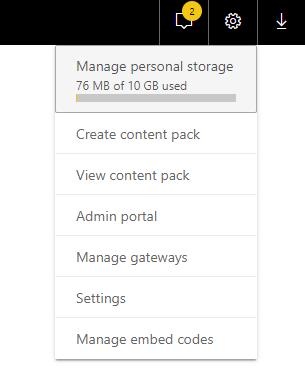
Have you configured the data source in power bi service? Click the "Gear"-> click "Manage gateways", then input the data source settings.
Community Support Team _ Jimmy Tao
If this post helps, then please consider Accept it as the solution to help the other members find it more quickly.
Have you configured the data source in power bi service? Click the "Gear"-> click "Manage gateways", then input the data source settings.
Community Support Team _ Jimmy Tao
If this post helps, then please consider Accept it as the solution to help the other members find it more quickly.
Don't miss out on Data Days, June 15 through August 7. Learn Fabric, Power BI, SQL, AI and more.
Check out the May 2026 Power BI update to learn about new features.
| User | Count |
|---|---|
| 23 | |
| 21 | |
| 20 | |
| 17 | |
| 13 |
| User | Count |
|---|---|
| 58 | |
| 51 | |
| 37 | |
| 30 | |
| 26 |