Join us at FabCon Atlanta from March 16 - 20, 2026, for the ultimate Fabric, Power BI, AI and SQL community-led event. Save $200 with code FABCOMM.
Register now!The Power BI Data Visualization World Championships is back! It's time to submit your entry. Live now!
I am linking to one Salesforce object, and within that object I have two columns that need to be expanded to pull one field each. All working well using Power BI desktop and manual refreshes in the app have no issues. I verified the refresh as well that it is picking up new data.
However, once I publish the report to Power BI Service, neither the manual nor the scheduled refresh work. I always get the same error message implicating the expanded column(s). Simply stating that the column could not be found in the source table. In my case it is the Opportunity table and the expanded column is called RecordType. I expand RecordType to pick up the name column so Power BI creates a column name of RecordType.name.
So there seems to be some kind of disconnect between how the desktop application is managing refresh vs the online service. I tried to troubleshoot quite a bit but really not getting anywhere. Any help or ideas would be greatly appreciated!
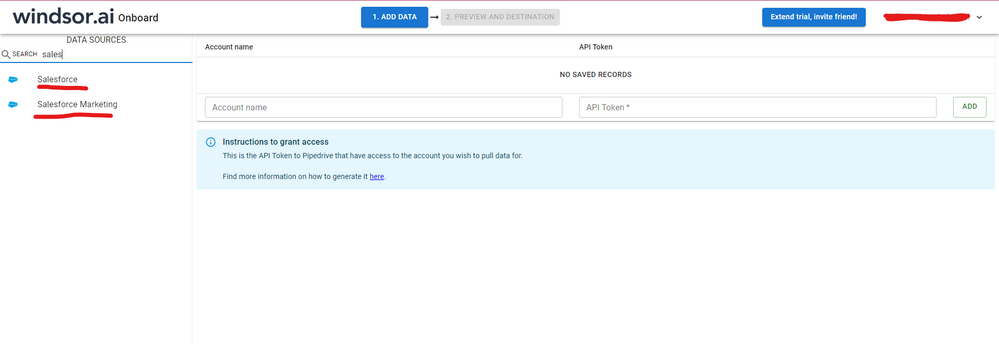
Hi @Anonymous were you able to find a solution? I've used the Salesforce connector but I had some issues updating my report on the service too. As a workaround, maybe you can try to test your connection with a 3rd party connector. I've tried windsor.ai, supermetrics and funnel.io. I stayed with windsor because it is much cheaper so just to let you know other options. In case you wonder, to make the connection first search for the Salesforce connector in the data sources list:
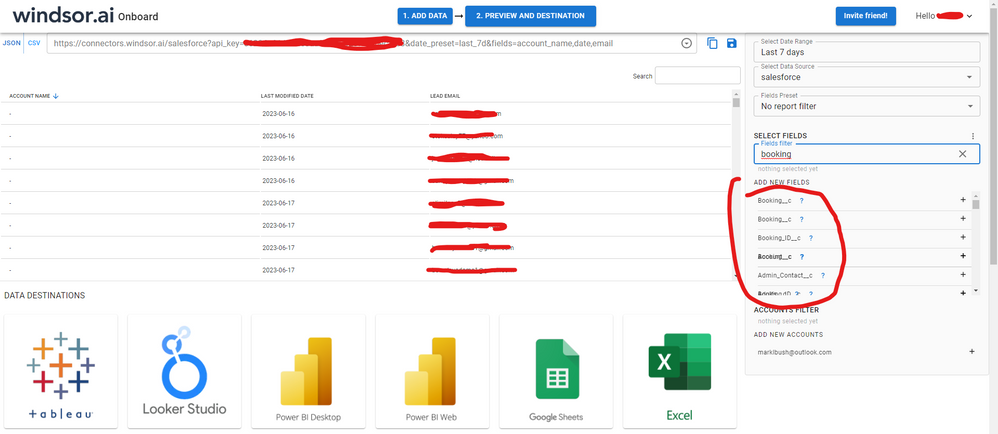
After that, just grant access to your Salesforce account using your credentials, then on preview and destination page you will see a preview of your Salesforce fields:
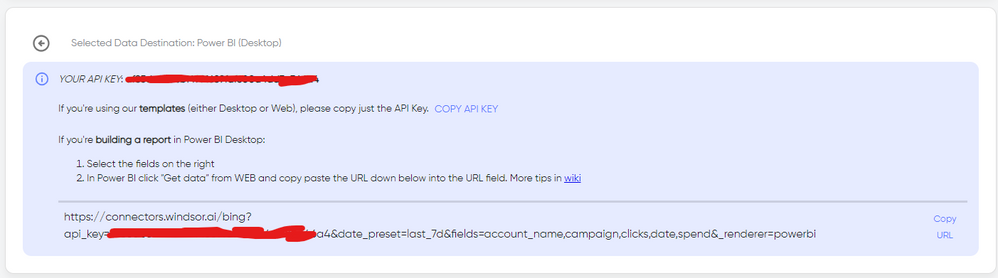
There just select the fields you need. It is also compatible with custom fields and custom objects, so you'll be able to export them through windsor. Finally, just select PBI as your data destination and finally just copy and paste the url on PBI --> Get Data --> Web --> Paste the url.
@Anonymous
You may check if the following post helps.
Hello,
It doesn't seem to be the same issue. In my case it is the expanded columns that spring the error in the Power BI service. Again, not happening with refresh in the desktop client. Here is the first part of my query that is causing the error:
let
Source = Salesforce.Data("https://login.salesforce.com/", [CreateNavigationProperties=true]),
Opportunity = Source{[Name="Opportunity"]}[Data],
#"Expanded RecordType" = Table.ExpandRecordColumn(Opportunity, "RecordType", {"Name"}, {"RecordType.Name"}),
#"Expanded Owner" = Table.ExpandRecordColumn(#"Expanded RecordType", "Owner", {"Name"}, {"Owner.Name"}),
The Power BI Data Visualization World Championships is back! It's time to submit your entry.
Check out the January 2026 Power BI update to learn about new features.
| User | Count |
|---|---|
| 60 | |
| 49 | |
| 30 | |
| 25 | |
| 23 |
| User | Count |
|---|---|
| 131 | |
| 103 | |
| 58 | |
| 39 | |
| 31 |