Join us at FabCon Atlanta from March 16 - 20, 2026, for the ultimate Fabric, Power BI, AI and SQL community-led event. Save $200 with code FABCOMM.
Register now!Learn from the best! Meet the four finalists headed to the FINALS of the Power BI Dataviz World Championships! Register now
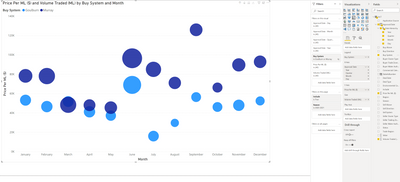
I'd like to create a scatter chart displaying multiple readings on each date. See sample below created in Excel.
Ultimately I'd like to have the size of the symbol based on the value and color based on another attribute in my data.
Looking in Power BI it only provides the option to summarise the values on the Y-axis to create something like;
Is it possible to cshow multiple rows for the same date on the chart like in Excel?
Hi, @craigfeuerherdt
There seems no problem with your sreenshot. It should be displayed like excel when you drill down to day.
Did I answer your question ? Please mark my reply as solution. Thank you very much.
If not, please feel free to ask me.
Best Regards,
Community Support Team _ Janey
@craigfeuerherdt , Try adding more columns on axis and expand them using the reverse Y sign.
Detail and legend columns will be the final level you have
Share feedback directly with Fabric product managers, participate in targeted research studies and influence the Fabric roadmap.
Check out the February 2026 Power BI update to learn about new features.
| User | Count |
|---|---|
| 53 | |
| 52 | |
| 39 | |
| 15 | |
| 15 |
| User | Count |
|---|---|
| 94 | |
| 81 | |
| 34 | |
| 29 | |
| 25 |