cancel
Showing results for 
Search instead for 
Did you mean: 

Get Fabric Certified for FREE during Fabric Data Days. Don't miss your chance! Request now

Reply
Ramachandran
Helper III
Helper III

Scatter chart - Show all the values

Hi, Someone assist me,

I have two dimensions (Country and City) and two fact tables like Fact1 and Fact2.

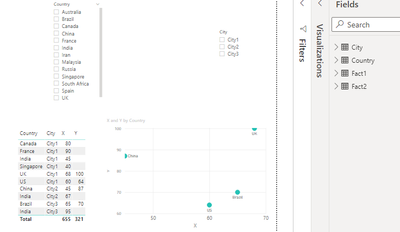
I'm trying to create scatter chart based on Fact1 (x) and Fact2 (y) values. but few of the Fact2 (Y) values are blank so it not showing all the country on the visual. For this case, Is it possible to show all the Country value? Currently, it is showing 4 countries because of x and y values.

If it is any blank value for X axis and Y axis should be consider as zero. How I can add dummi (zero) value for this? 


My current data is look like, 

Ramachandran_0-1620385207369.png

Also, I attached .pbix file here Scatter chart.pbix - Google Drive


thanks,

Ram


1 ACCEPTED SOLUTION
Anonymous
Not applicable

Hi  @Ramachandran  ,

Here are the steps you can follow:

1. Create calculated column.


Column =
var _1=
CALCULATE(MAX('Fact2'[Y]),FILTER(ALL(Fact2),[Country]=EARLIER([Country])))
return
DIVIDE([X],_1)


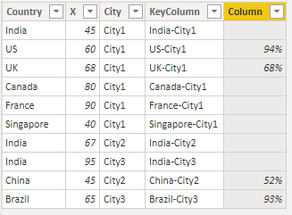
Result:

v-yangliu-msft_2-1620722375922.png

2. Create measure.


flag =
IF(MAX('Fact1'[Column])=BLANK(),BLANK(),
"X"&"-"&FORMAT(MAX('Fact1'[Column]),"Percent"))


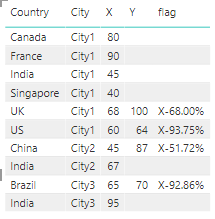
3. Result:

v-yangliu-msft_0-1620722479315.png


Best Regards,

Liu Yang

If this post helps, then please consider Accept it as the solution to help the other members find it more quickly.

View solution in original post

3 REPLIES 3
Anonymous
Not applicable

Hi  @Ramachandran  ,

Here are the steps you can follow:

1. Create calculated column.


Column =
var _1=
CALCULATE(MAX('Fact2'[Y]),FILTER(ALL(Fact2),[Country]=EARLIER([Country])))
return
DIVIDE([X],_1)


Result:

v-yangliu-msft_2-1620722375922.png

2. Create measure.


flag =
IF(MAX('Fact1'[Column])=BLANK(),BLANK(),
"X"&"-"&FORMAT(MAX('Fact1'[Column]),"Percent"))


3. Result:

v-yangliu-msft_0-1620722479315.png


Best Regards,

Liu Yang

If this post helps, then please consider Accept it as the solution to help the other members find it more quickly.

amitchandak
Super User
Super User

@Ramachandran ,

Create a measure like sum(Fact2[Y])+0  and use


Share with Power BI Enthusiasts: Full Power BI Video (20 Hours) YouTube
Microsoft Fabric Series 60+ Videos YouTube
Microsoft Fabric Hindi End to End YouTube

Thank you for your quick response and it is working fine.

I have one more question, I'm going to create percentage column based on x and y value. Is it possible to apply same thing in percentage field (new measure)?

For example, X - 65% (new measure), Y-75% (new measure)


thanks,

Ram


Helpful resources

Announcements
November Power BI Update Carousel

Power BI Monthly Update - November 2025

Check out the November 2025 Power BI update to learn about new features.

Fabric Data Days Carousel

Fabric Data Days

Advance your Data & AI career with 50 days of live learning, contests, hands-on challenges, study groups & certifications and more!

FabCon Atlanta 2026 carousel

FabCon Atlanta 2026

Join us at FabCon Atlanta, March 16-20, for the ultimate Fabric, Power BI, AI and SQL community-led event. Save $200 with code FABCOMM.

Top Solution Authors
Top Kudoed Authors