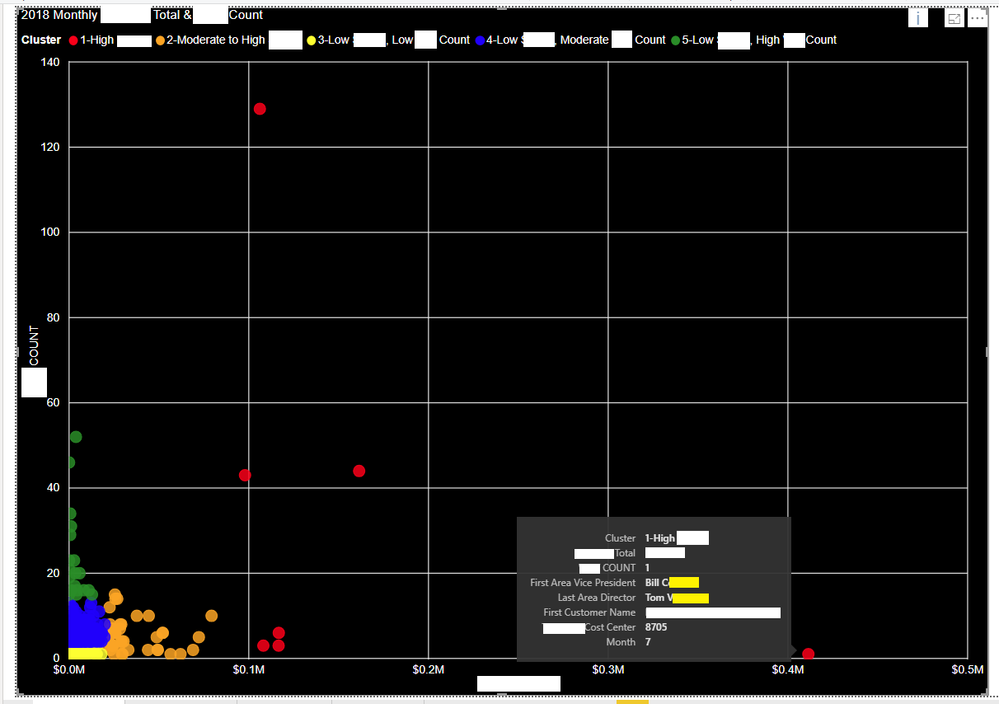
I have built a scatter plot, but the labeling of non-numeric data is being incorrectly aggregated and labeled. The data is a count of events and a total spend (actual metric labels removed for security) for each of our sites in 2018. A site could thus have up to 12 indidivual points on this scatter plot, 1 for each month.
The problem is that in my tooltip a first and last aggregation is placed on the Area Vice President and the Area Director. The label says the AVP and Director is Bill C and Tom V when it should be Rob M and Rachelle W (see data below). I want there to be no aggregation on these points, the same way that I have no aggregation on my Total, Count, Cost Center, Month, Cluster label, etc.
Does anyone have any idea why I cannot remove this aggregation on my non numeric data?
Here is an example of the data structure:
Row | Customer Account Number | Customer Name | Cost Center | Area Vice President | Area Director | Year | Month | COUNT | Total | Cluster |
1078 | ABC123 | Customer A | 8705 | Rob M | Rachelle W | 2018 | 4 | 1 | 0 | 3 |
1079 | ABC123 | Customer A | 8705 | Rob M | Rachelle W | 2018 | 7 | 1 | $410,000 | 1 |
1080 | ABC123 | Customer A | 8705 | Rob M | Rachelle W | 2018 | 10 | 1 | $1,000 | 3 |
Here is a picture of the scatterplot and the incorrect aggregation and labeling: