This time we’re going bigger than ever. Fabric, Power BI, SQL, AI and more. We're covering it all. You won't want to miss it.
Learn moreDid you hear? There's a new SQL AI Developer certification (DP-800). Start preparing now and be one of the first to get certified. Register now
I work on several project simultaneously in development stage.
When data changes, some steps becomes invalid (For eg: Due to missing columns/renamed columns). Due to this, sometimes the steps (in Applied steps) gets deleted on Refresh, and I loose track of what was done.
Is there a way to save/store the Applied steps to keep a track on what I had done earlier?
For now, either I manually document it or save M-code to a text editor.
Hi @PC20 ,
According to your description, your requirement is back up applied steps in Power Query Editor.
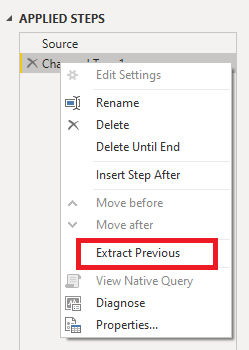
You can try to right-click on the last step and select "Extrac Previous", which will generate a backup table with all the previous application steps.
Best Regards,
Gallen Luo
If this post helps, then please consider Accept it as the solution to help the other members find it more quickly.
@v-jialluo-msft I tried this, but it creates an extra query (Increased processing) with the previous steps.
And the original query has been modified to include only the Source and the last step, which is not my requirement.
I want to keep a track of what I have done without increasing the processing (like additional query for backup) or any modifications to my existing query.
Check out the April 2026 Power BI update to learn about new features.
Sign up to receive a private message when registration opens and key events begin.
If you have recently started exploring Fabric, we'd love to hear how it's going. Your feedback can help with product improvements.
| User | Count |
|---|---|
| 34 | |
| 31 | |
| 25 | |
| 20 | |
| 16 |
| User | Count |
|---|---|
| 60 | |
| 48 | |
| 29 | |
| 23 | |
| 23 |