Join us at FabCon Atlanta from March 16 - 20, 2026, for the ultimate Fabric, Power BI, AI and SQL community-led event. Save $200 with code FABCOMM.
Register now!The Power BI Data Visualization World Championships is back! Get ahead of the game and start preparing now! Learn more
I'm trying to use the SandDance visual in a time series report as the ability to color parts of the line in a line chart is very helpful; also the transitions when changing metric are visually appealing.
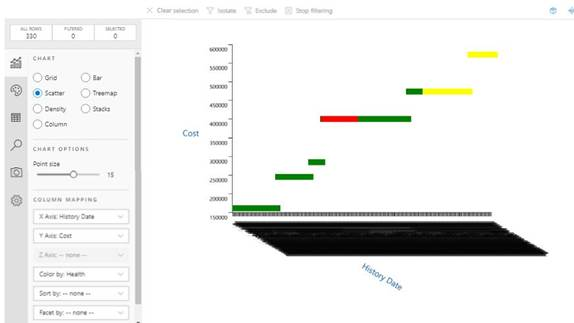
My problem is that the x-axis labels for time series dates is terrible; all dates are crowded together:
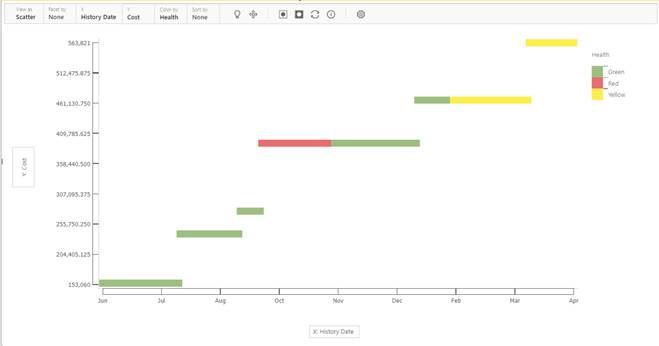
The original version of SandDance worked very well for this scenario:
Is there any way to fix my x-axis problem?
Thanks for any help!
@Shreyas1902 , if it is custom visual, you have to check with the developer.
Do you have option "Type" under x-Axis in properties , make it continuous
Thanks for the reply! Unfortunately there is no continuous option for the axes. The developer is Microsoft and I'm hoping their support people are watching this forum and can give an answer.
Hi @Shreyas1902 ,
It seems there are so many items display on X axis to cause this problem... Please click gear icon and adjust the value of X axis text angle:
Adjust X axis text angle
If there is no improvement, you can try to contact Custom Visual support team and ask for help.
Best Regards
Rena
The Power BI Data Visualization World Championships is back! Get ahead of the game and start preparing now!
| User | Count |
|---|---|
| 46 | |
| 42 | |
| 34 | |
| 31 | |
| 21 |
| User | Count |
|---|---|
| 133 | |
| 126 | |
| 94 | |
| 79 | |
| 65 |