Get Fabric certified for FREE!
Don't miss your chance to take the Fabric Data Engineer (DP-700) exam on us!
Learn more- Power BI forums
- Get Help with Power BI
- Desktop
- Service
- Report Server
- Power Query
- Mobile Apps
- Developer
- DAX Commands and Tips
- Custom Visuals Development Discussion
- Health and Life Sciences
- Power BI Spanish forums
- Translated Spanish Desktop
- Training and Consulting
- Instructor Led Training
- Dashboard in a Day for Women, by Women
- Galleries
- Data Stories Gallery
- Themes Gallery
- Contests Gallery
- QuickViz Gallery
- Quick Measures Gallery
- Visual Calculations Gallery
- Notebook Gallery
- Translytical Task Flow Gallery
- TMDL Gallery
- R Script Showcase
- Webinars and Video Gallery
- Ideas
- Custom Visuals Ideas (read-only)
- Issues
- Issues
- Events
- Upcoming Events
Next up in the FabCon + SQLCon recap series: The roadmap for Microsoft SQL and Maximizing Developer experiences in Fabric. All sessions are available on-demand after the live show. Register now
- Power BI forums
- Forums
- Get Help with Power BI
- Desktop
- Re: Sample generation chalenge
- Subscribe to RSS Feed
- Mark Topic as New
- Mark Topic as Read
- Float this Topic for Current User
- Bookmark
- Subscribe
- Printer Friendly Page

- Mark as New
- Bookmark
- Subscribe
- Mute
- Subscribe to RSS Feed
- Permalink
- Report Inappropriate Content
Sample generation chalenge
Hello Power friends,
My question is how can I create a sample table with this sourcet:
Group, Item
1,aaaa
1,bbbb
1,cccc
1,ddddd
2,wwwww
2,rrrrrrr
2,ttttttt
2,uuuuuu
2,iiiiiii
2,dddddd
I need to create a sample table with all Group and the top 30% of the count(item) of each group, like the example bellow:
Group, Item
1,aaaa // (one item (30% ~1,2) because the group 1 has 4 records
2,wwwww // (two items (30% ~1.8) because group 2 has 6 records
2,rrrrrrr
Thanks for your time.
Solved! Go to Solution.


- Mark as New
- Bookmark
- Subscribe
- Mute
- Subscribe to RSS Feed
- Permalink
- Report Inappropriate Content
Hi @Anonymous,
Try this
let
    Source = Table.FromRows(Json.Document(Binary.Decompress(Binary.FromText("i45Wci/KLy3QUfAsSc1VitWJVjLUSQQCKDMJCKDMZCCAMlNAAMw20ikHASi7CAKgvBIIgPJKwQDKyYQAKC8Fal4sAA==", BinaryEncoding.Base64), Compression.Deflate)), let _t = ((type text) meta [Serialized.Text = true]) in type table [Column1 = _t]),
    #"Changed Type" = Table.TransformColumnTypes(Source,{{"Column1", type text}}),
    #"Split Column by Delimiter" = Table.SplitColumn(#"Changed Type", "Column1", Splitter.SplitTextByDelimiter(",", QuoteStyle.Csv), {"Column1.1", "Column1.2"}),
    #"Changed Type1" = Table.TransformColumnTypes(#"Split Column by Delimiter",{{"Column1.1", type text}, {"Column1.2", type text}}),
    #"Promoted Headers" = Table.PromoteHeaders(#"Changed Type1", [PromoteAllScalars=true]),
    #"Changed Type2" = Table.TransformColumnTypes(#"Promoted Headers",{{"Group", Int64.Type}, {" Item", type text}}),
    //first count the number of rows then combine those with the same group into one table
    #"Grouped Rows" = Table.Group(#"Changed Type2", {"Group"}, {{"Count", each Table.RowCount(_), type number}, {"Items", each _, type table [Group=number, #" Item"=text]}}),
    #"Added Custom" = Table.AddColumn(#"Grouped Rows", "Top 30%", each
                        let
                        //get the top 30% rounded to the nearest whole number
                        x = Number.Round( [Count] * .30, 0)
                        in
                        //keep the first x rows only
                        Table.FirstN([Items],x), type table),
                            #"Removed Columns" = Table.RemoveColumns(#"Added Custom",{"Items"}),
                            #"Expanded Top 30%" = Table.ExpandTableColumn(#"Removed Columns", "Top 30%", {" Item"}, {" Item"}),
    #"Changed Type3" = Table.TransformColumnTypes(#"Expanded Top 30%",{{" Item", type text}})
in
    #"Changed Type3"
Dane Belarmino | Microsoft MVP | Proud to be a Super User!
Did I answer your question? Mark my post as a solution!
"Tell me and I’ll forget; show me and I may remember; involve me and I’ll understand."
Need Power BI consultation, get in touch with me on LinkedIn or hire me on UpWork.
Learn with me on YouTube @DAXJutsu or follow my page on Facebook @DAXJutsuPBI.
- Mark as New
- Bookmark
- Subscribe
- Mute
- Subscribe to RSS Feed
- Permalink
- Report Inappropriate Content
Hi @Anonymous,
You can get the results by the following steps:
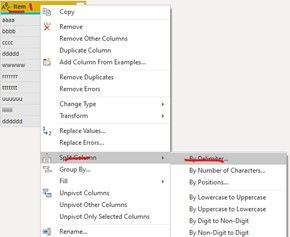
- Split the column by delimiter “,” into 2 columns: Group and Item in Power Query Editor
2. Create one calculated column Items as below screenhot
3. Create table visual, drag column [items] onto visual and filter the non-blank value of column [Items] at visual level filter
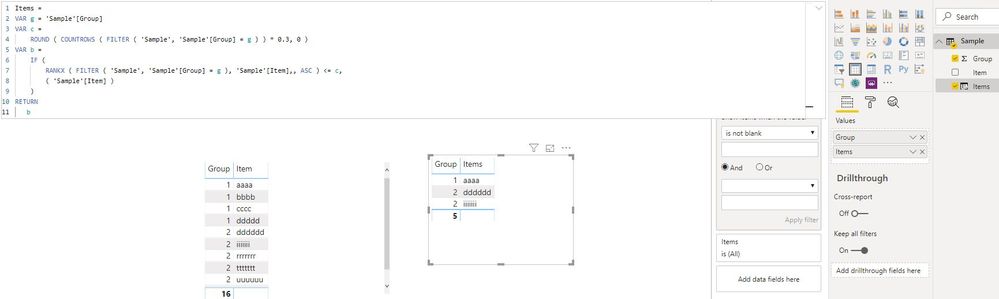
You can find all details in this sample PBIX file.
Best Regards
Rena
- Mark as New
- Bookmark
- Subscribe
- Mute
- Subscribe to RSS Feed
- Permalink
- Report Inappropriate Content
Hi @Anonymous,
You can get the results by the following steps:
- Split the column by delimiter “,” into 2 columns: Group and Item in Power Query Editor
2. Create one calculated column Items as below screenhot
3. Create table visual, drag column [items] onto visual and filter the non-blank value of column [Items] at visual level filter
You can find all details in this sample PBIX file.
Best Regards
Rena
- Mark as New
- Bookmark
- Subscribe
- Mute
- Subscribe to RSS Feed
- Permalink
- Report Inappropriate Content
Thanks a lot for you time @Anonymous . Very elegant solution.
- Mark as New
- Bookmark
- Subscribe
- Mute
- Subscribe to RSS Feed
- Permalink
- Report Inappropriate Content
Hi @Anonymous,
Try this
let
    Source = Table.FromRows(Json.Document(Binary.Decompress(Binary.FromText("i45Wci/KLy3QUfAsSc1VitWJVjLUSQQCKDMJCKDMZCCAMlNAAMw20ikHASi7CAKgvBIIgPJKwQDKyYQAKC8Fal4sAA==", BinaryEncoding.Base64), Compression.Deflate)), let _t = ((type text) meta [Serialized.Text = true]) in type table [Column1 = _t]),
    #"Changed Type" = Table.TransformColumnTypes(Source,{{"Column1", type text}}),
    #"Split Column by Delimiter" = Table.SplitColumn(#"Changed Type", "Column1", Splitter.SplitTextByDelimiter(",", QuoteStyle.Csv), {"Column1.1", "Column1.2"}),
    #"Changed Type1" = Table.TransformColumnTypes(#"Split Column by Delimiter",{{"Column1.1", type text}, {"Column1.2", type text}}),
    #"Promoted Headers" = Table.PromoteHeaders(#"Changed Type1", [PromoteAllScalars=true]),
    #"Changed Type2" = Table.TransformColumnTypes(#"Promoted Headers",{{"Group", Int64.Type}, {" Item", type text}}),
    //first count the number of rows then combine those with the same group into one table
    #"Grouped Rows" = Table.Group(#"Changed Type2", {"Group"}, {{"Count", each Table.RowCount(_), type number}, {"Items", each _, type table [Group=number, #" Item"=text]}}),
    #"Added Custom" = Table.AddColumn(#"Grouped Rows", "Top 30%", each
                        let
                        //get the top 30% rounded to the nearest whole number
                        x = Number.Round( [Count] * .30, 0)
                        in
                        //keep the first x rows only
                        Table.FirstN([Items],x), type table),
                            #"Removed Columns" = Table.RemoveColumns(#"Added Custom",{"Items"}),
                            #"Expanded Top 30%" = Table.ExpandTableColumn(#"Removed Columns", "Top 30%", {" Item"}, {" Item"}),
    #"Changed Type3" = Table.TransformColumnTypes(#"Expanded Top 30%",{{" Item", type text}})
in
    #"Changed Type3"
Dane Belarmino | Microsoft MVP | Proud to be a Super User!
Did I answer your question? Mark my post as a solution!
"Tell me and I’ll forget; show me and I may remember; involve me and I’ll understand."
Need Power BI consultation, get in touch with me on LinkedIn or hire me on UpWork.
Learn with me on YouTube @DAXJutsu or follow my page on Facebook @DAXJutsuPBI.
- Mark as New
- Bookmark
- Subscribe
- Mute
- Subscribe to RSS Feed
- Permalink
- Report Inappropriate Content


- Mark as New
- Bookmark
- Subscribe
- Mute
- Subscribe to RSS Feed
- Permalink
- Report Inappropriate Content
Here's my shot (please test on a bigger dataset)
let
    Source = Table.FromRows(Json.Document(Binary.Decompress(Binary.FromText("i45WMtRJBAKlWB0QMwkIoMxkIIAyU0AAzDbSKQcBKLsIAqC8EgiA8krBAMrJhAAoLwVqXiwA", BinaryEncoding.Base64), Compression.Deflate)), let _t = ((type text) meta [Serialized.Text = true]) in type table [#"Group, Item" = _t]),
    #"Changed Type" = Table.TransformColumnTypes(Source,{{"Group, Item", type text}}),
    #"Split Column by Delimiter" = Table.SplitColumn(#"Changed Type", "Group, Item", Splitter.SplitTextByEachDelimiter({","}, QuoteStyle.Csv, false), {"Group, Item.1", "Group, Item.2"}),
    #"Changed Type1" = Table.TransformColumnTypes(#"Split Column by Delimiter",{{"Group, Item.1", Int64.Type}, {"Group, Item.2", type text}}),
    #"Renamed Columns" = Table.RenameColumns(#"Changed Type1",{{"Group, Item.1", "Group"}, {"Group, Item.2", "Item"}}),
    #"Grouped Rows" = Table.Group(#"Renamed Columns", {"Group"}, {{"CountofGroup", each Table.RowCount(_), type number}, {"Details", each _, type table [Group=number, Item=text]}}),
    #"Added Custom" = Table.AddColumn(#"Grouped Rows", "Custom", each Table.AddIndexColumn([Details],"Ind",1,1)),
    #"Expanded Custom" = Table.ExpandTableColumn(#"Added Custom", "Custom", {"Item", "Ind"}, {"Custom.Item", "Custom.Ind"}),
    #"Removed Columns" = Table.RemoveColumns(#"Expanded Custom",{"Details"}),
    #"Changed Type2" = Table.TransformColumnTypes(#"Removed Columns",{{"Custom.Ind", Int64.Type}}),
    #"Added Custom1" = Table.AddColumn(#"Changed Type2", "AThird", each Number.Round([CountofGroup] * 3/10)),
    #"Choose rows" = Table.SelectRows(#"Added Custom1", each ( [Custom.Ind] <= [AThird])),
    #"Removed Columns1" = Table.RemoveColumns(#"Choose rows",{"CountofGroup", "Custom.Ind", "AThird"}),
    #"Changed Type3" = Table.TransformColumnTypes(#"Removed Columns1",{{"Custom.Item", type text}})
in
    #"Changed Type3"
There are some extra steps to tidy up the data which you won't need.
- Mark as New
- Bookmark
- Subscribe
- Mute
- Subscribe to RSS Feed
- Permalink
- Report Inappropriate Content
Helpful resources

New to Fabric Survey
If you have recently started exploring Fabric, we'd love to hear how it's going. Your feedback can help with product improvements.

Power BI DataViz World Championships - June 2026
A new Power BI DataViz World Championship is coming this June! Don't miss out on submitting your entry.

Join our Fabric User Panel
Share feedback directly with Fabric product managers, participate in targeted research studies and influence the Fabric roadmap.

Power BI Community Update - March 2026
Check out the March 2026 Power BI update to learn about new features.

| User | Count |
|---|---|
| 50 | |
| 44 | |
| 42 | |
| 18 | |
| 18 |


| User | Count |
|---|---|
| 69 | |
| 69 | |
| 32 | |
| 32 | |
| 32 |


