cancel
Showing results for 
Search instead for 
Did you mean: 

The Power BI Data Visualization World Championships is back! Get ahead of the game and start preparing now! Learn more

Reply
Anonymous
Not applicable

Same Formula applied on identical Tables gives different outcome

Hi everyone,


I need the valuable help of this fantastic community! I hope someone can explain me the reason why the same formula (SELECTCOLUMNS) applied to two IDENTICAL tables produces very different outcomes!


Picture 'desired outcome' shows what I want to achieve.


It is very important to me have this point clarified because I need SELECTCOLUMNS behaving as per example 1 that is:

- populate 'cost 20' column with all the records of t_SCRP[Cost] filtered by year 2020

- populate 'cost 21' column with all the records of t_SCRP[Cost] filtered by year 2021

- populate 'cost 22' column with all the records of t_SCRP[Cost] filtered by year 2022

- and so on, for upcoming years...


_vt SCRP 1 =
SELECTCOLUMNS(t_SCRP,
"date", t_SCRP[Date],
"cost 20", CALCULATE(SUM(t_SCRP[Cost]), FILTER(t_Cal, t_Cal[Year]=2020)),
"cost 21", CALCULATE(SUM(t_SCRP[Cost]), FILTER(t_Cal, t_Cal[Year]=2021)),
"cost 22", CALCULATE(SUM(t_SCRP[Cost]), FILTER(t_Cal, t_Cal[Year]=2022))
)
 
_vt SCRP 2 =
SELECTCOLUMNS(t_SCRP_2,
"date", t_SCRP_2[Date],
"cost 20", CALCULATE(SUM(t_SCRP_2[Cost]), FILTER(t_Cal, t_Cal[Year]=2020)),
"cost 21", CALCULATE(SUM(t_SCRP_2[Cost]), FILTER(t_Cal, t_Cal[Year]=2021)),
"cost 22", CALCULATE(SUM(t_SCRP_2[Cost]), FILTER(t_Cal, t_Cal[Year]=2022))
)
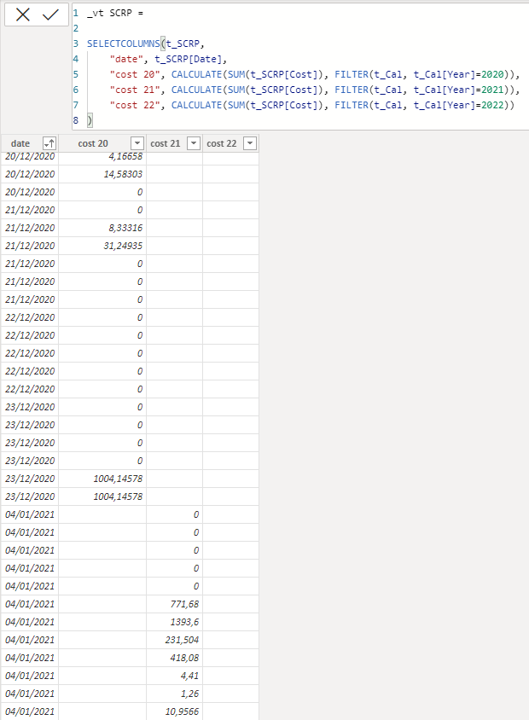
 

desired outcomedesired outcome

weird behaviourweird behaviour


Thanks and best regards!


2 ACCEPTED SOLUTIONS
HotChilli
Super User
Super User

Can you provide a sample pbix please?

View solution in original post

Anonymous
Not applicable

Thanks HotChilli, you are right, definitely the problem is into relationships!

Looking more in deep in my file, I also found that other tables giving same 'issue' have a 1:1 relationship with date table while others with *:1 relationship work well. Changing them to many-to-one (and cross filter direction set to 'single') has fixed the issue.

View solution in original post

4 REPLIES 4
HotChilli
Super User
Super User

Yes i got the file, thanks.

The problem is one of the source tables has a relationship with the date table and one does not.  I was going to take a guess that it was relationship based since getting all the same values for a measure usually indicates this.

Anonymous
Not applicable

Thanks HotChilli, you are right, definitely the problem is into relationships!

Looking more in deep in my file, I also found that other tables giving same 'issue' have a 1:1 relationship with date table while others with *:1 relationship work well. Changing them to many-to-one (and cross filter direction set to 'single') has fixed the issue.

HotChilli
Super User
Super User

Can you provide a sample pbix please?

Anonymous
Not applicable

Hi, here the link to download the file (please let me know if this works)

https://www.dropbox.com/sh/3e2z9adan0z1fv6/AADMORm0Fx0bX4YMMc4UZrgPa?dl=0

Helpful resources

Announcements
Power BI DataViz World Championships

Power BI Dataviz World Championships

The Power BI Data Visualization World Championships is back! Get ahead of the game and start preparing now!

November Power BI Update Carousel

Power BI Monthly Update - November 2025

Check out the November 2025 Power BI update to learn about new features.

FabCon Atlanta 2026 carousel

FabCon Atlanta 2026

Join us at FabCon Atlanta, March 16-20, for the ultimate Fabric, Power BI, AI and SQL community-led event. Save $200 with code FABCOMM.