cancel
Showing results for 
Search instead for 
Did you mean: 

We've captured the moments from FabCon & SQLCon that everyone is talking about, and we are bringing them to the community, live and on-demand. Starts on April 14th. Register now

Reply
Anonymous
Not applicable

Salesforce KnowledgeArticleVersion query error

Receiving this error when trying to pull in KnowledgeArticleVersion 


DataSource.Error: Implementation restriction: When querying or searching the KnowledgeArticleVersion object, you must filter using the following syntax: Id = [single ID], Id IN [list of ID's] or PublishStatus = [status]. In addition PublishStatus is only permitted in a top-level AND condition.
Details:
List


This is the Query:

let
Source = Salesforce.Data("https://test.my.salesforce.com", [CreateNavigationProperties=true]),
KnowledgeArticleVersion = Source{[Name="KnowledgeArticleVersion"]}[Data]
in
KnowledgeArticleVersion


Does anyone have experience with this?

1 ACCEPTED SOLUTION
v-qiuyu-msft
Community Support
Community Support

Hi @Anonymous,


In your scenario, please specify the Power Query below firstly to check if the Name column has "KnowledgeArticleVersion" record: 


let
Source = Salesforce.Data("https://test.my.salesforce.com", [CreateNavigationProperties=true]),
//KnowledgeArticleVersion = Source{[Name="KnowledgeArticleVersion"]}[Data]
in Source
//KnowledgeArticleVersion


According to KnowledgeArticleVersion API, it would be better if you post a thread on Salesforce developer forum on how to call this API. 


Best Regards,
Qiuyun Yu 

Community Support Team _ Qiuyun Yu
If this post helps, then please consider Accept it as the solution to help the other members find it more quickly.

View solution in original post

2 REPLIES 2
CoderZen08
Helper V
Helper V

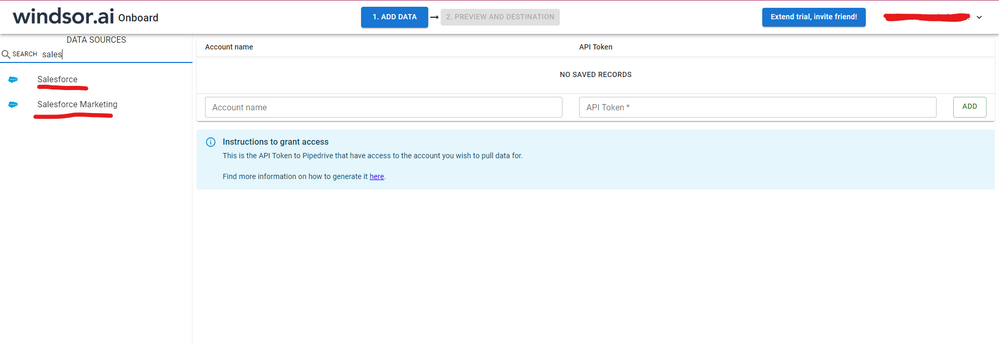
Hi, were you able to find a solution? As a workaround, maybe you can try to test your connection with a 3rd party connector, which pulls data directly from the SF objects API. I've tried windsor.ai, supermetrics and funnel.io. I stayed with windsor because it is much cheaper so just to let you know other options. In case you wonder, to make the connection first search for the Salesforce connector in the data sources list:


SALESFORCE-1.png


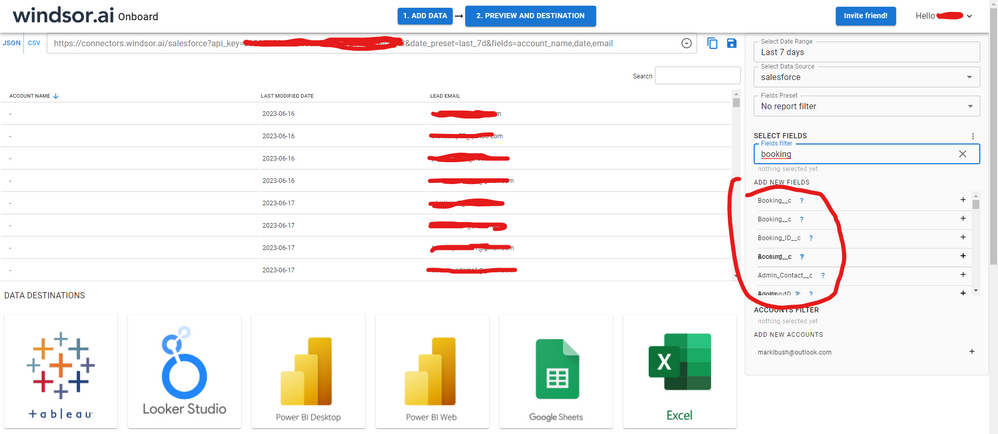
After that, just grant access to your Salesforce account using your credentials, then on preview and destination page you will see a preview of your Salesforce fields:


SALESFORCE-2.png


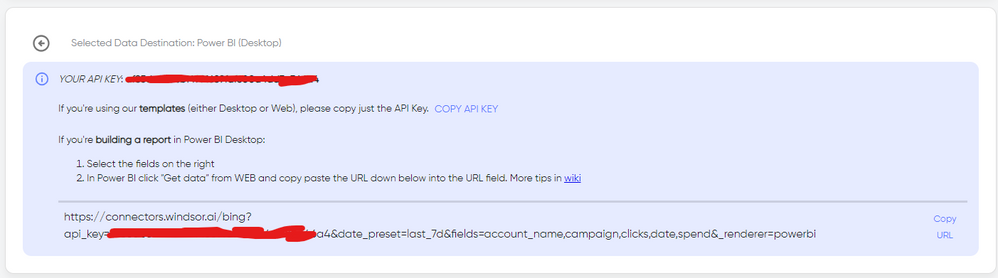
There just select the fields you need. It is also compatible with custom fields and custom objects, so you'll be able to export them through windsor.  Finally, just select PBI as your data destination and finally just copy and paste the url on PBI --> Get Data --> Web --> Paste the url. 


SELECT_DESTINATION_NEW.png

v-qiuyu-msft
Community Support
Community Support

Hi @Anonymous,


In your scenario, please specify the Power Query below firstly to check if the Name column has "KnowledgeArticleVersion" record: 


let
Source = Salesforce.Data("https://test.my.salesforce.com", [CreateNavigationProperties=true]),
//KnowledgeArticleVersion = Source{[Name="KnowledgeArticleVersion"]}[Data]
in Source
//KnowledgeArticleVersion


According to KnowledgeArticleVersion API, it would be better if you post a thread on Salesforce developer forum on how to call this API. 


Best Regards,
Qiuyun Yu 

Community Support Team _ Qiuyun Yu
If this post helps, then please consider Accept it as the solution to help the other members find it more quickly.

Helpful resources

Announcements
New to Fabric survey Carousel

New to Fabric Survey

If you have recently started exploring Fabric, we'd love to hear how it's going. Your feedback can help with product improvements.

Power BI DataViz World Championships carousel

Power BI DataViz World Championships - June 2026

A new Power BI DataViz World Championship is coming this June! Don't miss out on submitting your entry.

Join our Fabric User Panel

Join our Fabric User Panel

Share feedback directly with Fabric product managers, participate in targeted research studies and influence the Fabric roadmap.

March Power BI Update Carousel

Power BI Community Update - March 2026

Check out the March 2026 Power BI update to learn about new features.