cancel
Showing results for 
Search instead for 
Did you mean: 

Join the FabCon + SQLCon recap series. Up next: Power BI, Real-Time Intelligence, IQ and AI, and Data Factory take center stage. All sessions are available on-demand after the live show. Register now

Reply
AmandaSoborg
Advocate II
Advocate II

SalesForce missing columns

Hi everyone


When i Download my salesforce report (with 44 colums) only 30 of them shows up in Power BI. I know there is a limit to 2000 rows, but that doesn't apply to columns, right?

3 REPLIES 3
ReportMaster
Post Partisan
Post Partisan

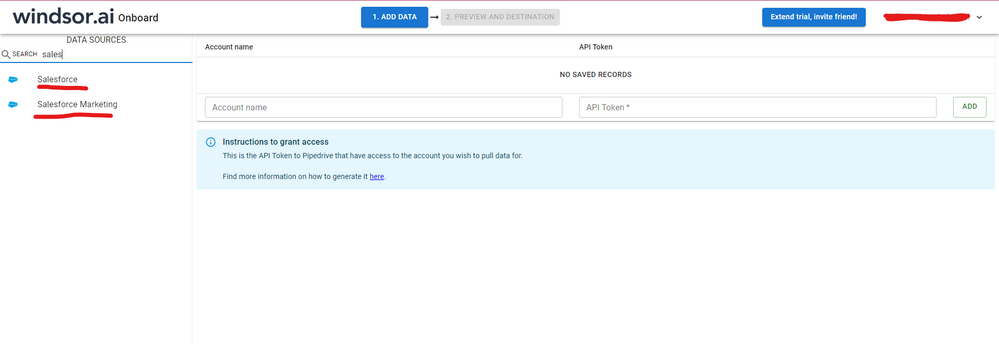
Hi @AmandaSoborg were you able to find a solution? As a workaround, maybe you can try to test your connection with a 3rd party connector, which pulls data from the SF objects API directly, the advantage is that in the tool UI you'll be able to select exactly the fields you need, so having like a pre-filter before moving it to Power BI can be helpful. I've tried windsor.ai, supermetrics and funnel.io. I stayed with windsor because it is much cheaper so just to let you know other options. In case you wonder, to make the connection first search for the Salesforce connector in the data sources list:
 

SALESFORCE-1.png


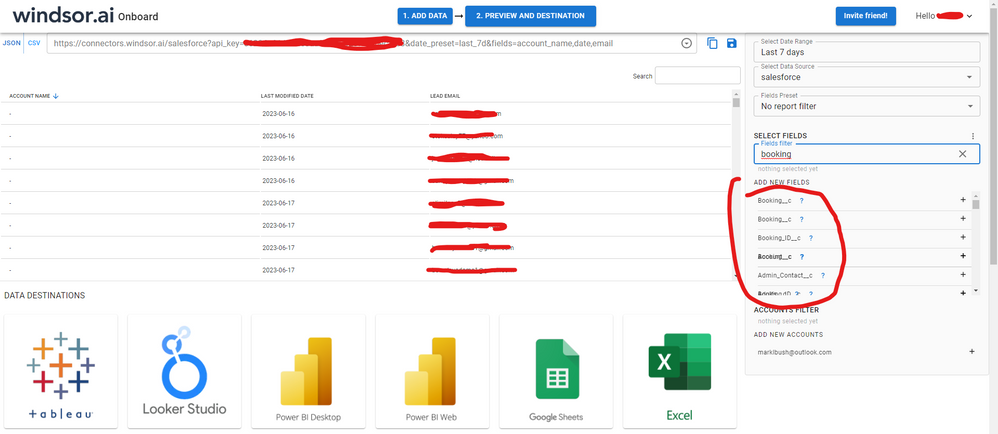
After that, just grant access to your Salesforce account using your credentials, then on preview and destination page you will see a preview of your Salesforce fields:
 

SALESFORCE-2.png


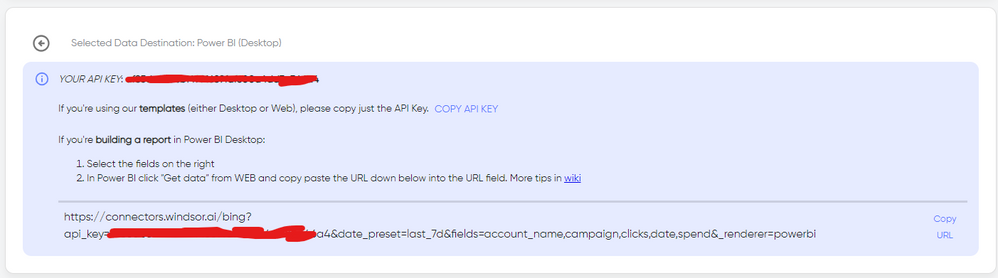
There just select the fields you need. It is also compatible with custom fields and custom objects, so you'll be able to export them through windsor.  Finally, just select PBI as your data destination and finally just copy and paste the url on PBI --> Get Data --> Web --> Paste the url. 
 

SELECT_DESTINATION_NEW.png

v-jiascu-msft
Microsoft Employee
Microsoft Employee

Hi @AmandaSoborg,


According to this document, the limitation should be up to 100. I would suggest:

1. Upgrade the Power BI Desktop to the latest Version: 2.51.4885.701 64-bit (October 2017);

2. Try the Salesforce Objects instead, which has little limits.


>>>The API can process only reports that contain up to 100 fields selected as columns.


Best Regards!

Dale

Community Support Team _ Dale
If this post helps, then please consider Accept it as the solution to help the other members find it more quickly.

hi @v-jiascu-msft


I have also treid the Objectives, but i find it hard to find all of the nesesarry data when doing it this way. Therefore i would like to download the report.


In SalesForce i have a lot of different values under a Folder. But when i am connecting to SalseForce through Power BI i cannot find these folders. If I could do it this way, I would use Objectives instead of Reports.

Helpful resources

Announcements
April Power BI Update Carousel

Power BI Monthly Update - April 2026

Check out the April 2026 Power BI update to learn about new features.

New to Fabric survey Carousel

New to Fabric Survey

If you have recently started exploring Fabric, we'd love to hear how it's going. Your feedback can help with product improvements.

Power BI DataViz World Championships carousel

Power BI DataViz World Championships - June 2026

A new Power BI DataViz World Championship is coming this June! Don't miss out on submitting your entry.

FabCon and SQLCon Highlights Carousel

FabCon &SQLCon Highlights

Experience the highlights from FabCon & SQLCon, available live and on-demand starting April 14th.