cancel
Showing results for 
Search instead for 
Did you mean: 

The Power BI Data Visualization World Championships is back! Get ahead of the game and start preparing now! Learn more

Reply
SG1080
Frequent Visitor

Sales Performance Ranking

Hello everybody,
I have the following challenge.


The following table is available to me for our sales goals.


RangAreaSales Target
1A105%
2B104%
3C100%
4D99%


The areas must not know each other about the targets. In order to give the areas a feeling for how they are currently standing, I would like to provide the areas with the following table. How can something like this be realized?

RangAreaDelta Target
1-+1%
2B104%
3--3%


I would be happy about your support


1 ACCEPTED SOLUTION
Icey
Community Support
Community Support

Hi @SG1080 ,


Assume that each "Area" in your scenario has a Email account. Then we can use RLS like so:


1. Create a "Email" table. I add Area "E", who is a manager of A, B, C, and D, and he can see all records.


Area Email
A a@test.com
B b@test.com
C c@test.com
D d@test.com
E e@test.com


Note: Don't create realtionships between your "Sales" table and this "Email" table.
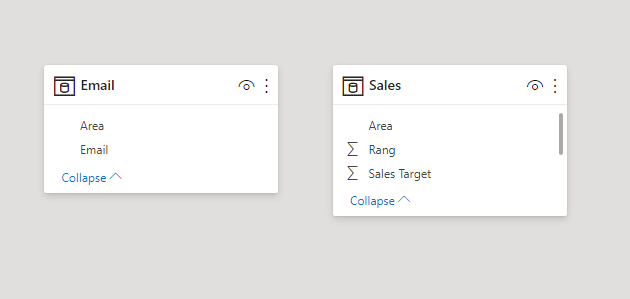
no relationship.PNG


2. Create measures.

Area Measure =
VAR SigninArea_ =
    MAX ( Email[Area] )
VAR SalesArea_ =
    DISTINCT ( ALLSELECTED ( Sales[Area] ) )
RETURN
    IF (
        NOT ( ISBLANK ( SigninArea_ ) ),
        IF (
            SigninArea_ IN SalesArea_,
            IF ( MAX ( 'Sales'[Area] ) = SigninArea_, MAX ( Sales[Area] ), "-" ),
            MAX ( Sales[Area] )
        )
    )
Sales Target Measure =
VAR SigninArea_ =
    MAX ( Email[Area] )
VAR SalesArea_ =
    DISTINCT ( ALLSELECTED ( Sales[Area] ) )
VAR SigninTarget_ =
    CALCULATE (
        SUM ( 'Sales'[Sales Target] ),
        FILTER ( ALLSELECTED ( 'Sales' ), 'Sales'[Area] = SigninArea_ )
    )
RETURN
    IF (
        NOT ( ISBLANK ( SigninArea_ ) ),
        IF (
            SigninArea_ IN SalesArea_,
            IF (
                MAX ( 'Sales'[Area] ) = SigninArea_,
                SigninTarget_,
                SUM ( 'Sales'[Sales Target] ) - SigninTarget_
            ),
            SUM ( Sales[Sales Target] )
        )
    )


3. Create a table visual.
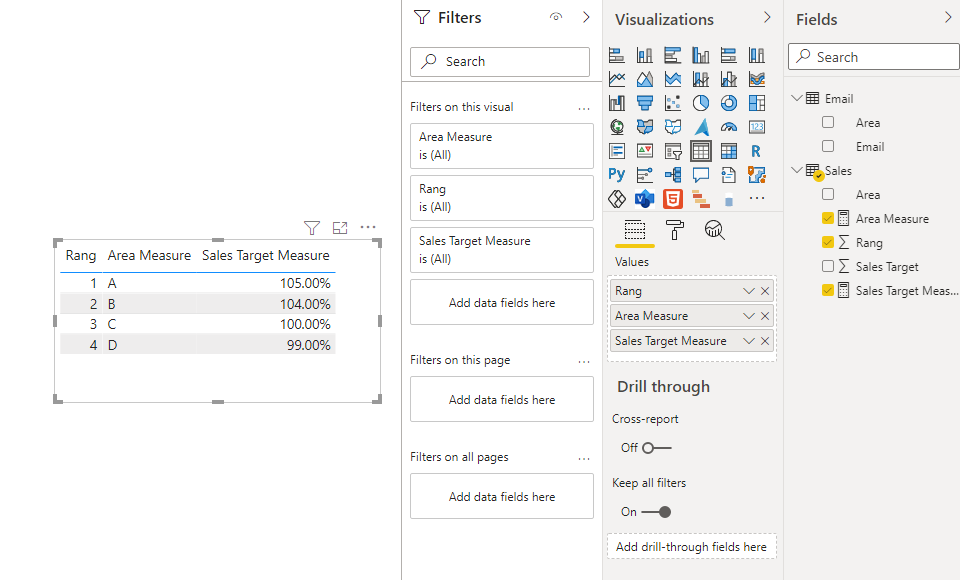
rang.PNG


4. Test.

rang.gif


Best Regards,

Icey


If this post helps, then please consider Accept it as the solution to help the other members find it more quickly.

View solution in original post

3 REPLIES 3
Icey
Community Support
Community Support

Hi @SG1080 ,


Assume that each "Area" in your scenario has a Email account. Then we can use RLS like so:


1. Create a "Email" table. I add Area "E", who is a manager of A, B, C, and D, and he can see all records.


Area Email
A a@test.com
B b@test.com
C c@test.com
D d@test.com
E e@test.com


Note: Don't create realtionships between your "Sales" table and this "Email" table.

no relationship.PNG


2. Create measures.

Area Measure =
VAR SigninArea_ =
    MAX ( Email[Area] )
VAR SalesArea_ =
    DISTINCT ( ALLSELECTED ( Sales[Area] ) )
RETURN
    IF (
        NOT ( ISBLANK ( SigninArea_ ) ),
        IF (
            SigninArea_ IN SalesArea_,
            IF ( MAX ( 'Sales'[Area] ) = SigninArea_, MAX ( Sales[Area] ), "-" ),
            MAX ( Sales[Area] )
        )
    )
Sales Target Measure =
VAR SigninArea_ =
    MAX ( Email[Area] )
VAR SalesArea_ =
    DISTINCT ( ALLSELECTED ( Sales[Area] ) )
VAR SigninTarget_ =
    CALCULATE (
        SUM ( 'Sales'[Sales Target] ),
        FILTER ( ALLSELECTED ( 'Sales' ), 'Sales'[Area] = SigninArea_ )
    )
RETURN
    IF (
        NOT ( ISBLANK ( SigninArea_ ) ),
        IF (
            SigninArea_ IN SalesArea_,
            IF (
                MAX ( 'Sales'[Area] ) = SigninArea_,
                SigninTarget_,
                SUM ( 'Sales'[Sales Target] ) - SigninTarget_
            ),
            SUM ( Sales[Sales Target] )
        )
    )


3. Create a table visual.

rang.PNG


4. Test.

rang.gif


Best Regards,

Icey


If this post helps, then please consider Accept it as the solution to help the other members find it more quickly.

parry2k
Super User
Super User

@SG1080 what is the logic behind the calculation? What decides the base target ? How come 3 is -3%, isn't it is -4% is base is B - 104%?


Why 4 - D is not showing up? 


You have to be detailed about your requirement to get the help? Nobody is going to guess. Read this post to get your answer quickly.

https://community.powerbi.com/t5/Community-Blog/How-to-Get-Your-Question-Answered-Quickly/ba-p/38490


Subscribe to the @PowerBIHowTo YT channel for an upcoming video on List and Record functions in Power Query!!

Learn Power BI and Fabric - subscribe to our YT channel - Click here: @PowerBIHowTo

If my solution proved useful, I'd be delighted to receive Kudos. When you put effort into asking a question, it's equally thoughtful to acknowledge and give Kudos to the individual who helped you solve the problem. It's a small gesture that shows appreciation and encouragement! ❤


Did I answer your question? Mark my post as a solution. Proud to be a Super User! Appreciate your Kudos 🙂
Feel free to email me with any of your BI needs.

The basic goal is given by a prediction. The performance of Area A is 1% better than Area B and Area C is 4% worse than Area B. Area B see that the one behind him is 4% worse but not which area exactly. The same in the other direction. Someone is 1% better, but who exactly is they not allowed to see?

Helpful resources

Announcements
Power BI DataViz World Championships

Power BI Dataviz World Championships

The Power BI Data Visualization World Championships is back! Get ahead of the game and start preparing now!

December 2025 Power BI Update Carousel

Power BI Monthly Update - December 2025

Check out the December 2025 Power BI Holiday Recap!

FabCon Atlanta 2026 carousel

FabCon Atlanta 2026

Join us at FabCon Atlanta, March 16-20, for the ultimate Fabric, Power BI, AI and SQL community-led event. Save $200 with code FABCOMM.