This time we’re going bigger than ever. Fabric, Power BI, SQL, AI and more. We're covering it all. You won't want to miss it.
Learn moreDid you hear? There's a new SQL AI Developer certification (DP-800). Start preparing now and be one of the first to get certified. Register now
Hi everyone,
I’ve been using SWITCH for my report but my issue is that its default value was not showing at all and I always have to keep at least one filter on.
Variance View = SWITCH(TRUE(),
VALUES(‘Table1’[Var]) = “Enabled”, [YOY VAR],
VALUES(‘Table1’[Var]) = “Disabled”, [TOTAL],
[TOTAL]))
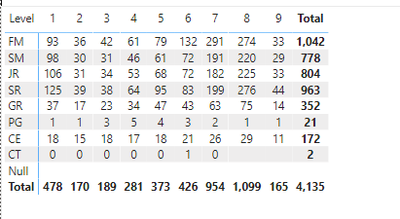
Attached is the matrix when the variance view is disabled. When I clear the filter, I expect it to still show [TOTAL], but the data disappears and there’s only a message saying ‘Can’t display the visual.’ Could anyone point out what did I do wrong?
Solved! Go to Solution.
Hi @TP129
You are using VALUES, so when you do not select the slicer to filter Var, it returns error, you can do it like this
Variance View =
VAR CurVar = SELECTEDVALUE('Table1'[Var],“Disabled”)
RETURN
SWITCH(TRUE(),
CurVar=“Enabled”, [YOY VAR],[TOTAL])
Hi @TP129
You are using VALUES, so when you do not select the slicer to filter Var, it returns error, you can do it like this
Variance View =
VAR CurVar = SELECTEDVALUE('Table1'[Var],“Disabled”)
RETURN
SWITCH(TRUE(),
CurVar=“Enabled”, [YOY VAR],[TOTAL])
Oh I see what's the problem here. It works now, thank you very much!
Check out the April 2026 Power BI update to learn about new features.
Sign up to receive a private message when registration opens and key events begin.
If you have recently started exploring Fabric, we'd love to hear how it's going. Your feedback can help with product improvements.
| User | Count |
|---|---|
| 37 | |
| 32 | |
| 27 | |
| 24 | |
| 17 |
| User | Count |
|---|---|
| 70 | |
| 50 | |
| 31 | |
| 26 | |
| 22 |