cancel
Showing results for 
Search instead for 
Did you mean: 

The Power BI Data Visualization World Championships is back! Get ahead of the game and start preparing now! Learn more

Reply
StoryofData
Helper III
Helper III

SWITCH FUNCTION

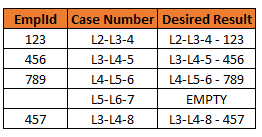
I am trying to use SWITCH, it seems to be working but when the column is not summarized but when I do a count then it counts BLANKS, what am I doing wrong? 

Column 2 =
SWITCH(
TRUE (),
'Table'[EmplId] = BLANK (), BLANK(),
COMBINEVALUES("-",'Table'[EmplId],'Table'[CaseNumber]))

StoryofData_0-1678735441559.png


1 ACCEPTED SOLUTION

I think the issue is after the last condition then.  Switch has a default if no conditions are true, e.g.

SWITCH(TRUE()
,Test, Result
,Test, Result
,Default)


Change your code to the following:

SWITCH (
TRUE (),
'Table'[EmplId] = BLANK (), BLANK (),
'Table'[IssueSub Formatted] = BLANK (), BLANK (),
'Table'[City] = "Not Applicable", BLANK (),
'Table'[City] = "Not Disclosed", BLANK (),
'Table'[IssueSub Formatted] = "Referral/Redirect", BLANK (),
'Table'[Title Categorized] = "Former Employee", BLANK (),
'Table'[EmplId] <> BLANK ()
,COMBINEVALUES (" - ", [CaseNumber], [EmplId]))


Let me know if that fixed it.  I removed the =TRUE()

View solution in original post

4 REPLIES 4
BrianConnelly
Resolver III
Resolver III

Why a SWITCH if you only have one condition?

IF(ISBLANK(EmpLid), BLANK(), COMBINEVALUES("-",'Table'[EmplId],'Table'[CaseNumber]))

I have at least 5 other conditions, I just shortened it for the sake of the question, thought I'd be able to apply the solution across the entire syntax

SWITCH (
TRUE (),
'Table'[EmplId] = BLANK (), BLANK (),
'Table'[IssueSub Formatted] = BLANK (), BLANK (),
'Table'[City] = "Not Applicable", BLANK (),
'Table'[City] = "Not Disclosed", BLANK (),
'Table'[IssueSub Formatted] = "Referral/Redirect", BLANK (),
'Table'[Title Categorized] = "Former Employee", BLANK (),
'Table'[EmplId] <> BLANK ()
= TRUE (),
COMBINEVALUES (" - ", [CaseNumber], [EmplId]))

If any of these columns have values I do not want - blanks, not applicable then I want the column value for that row to be empty

I think the issue is after the last condition then.  Switch has a default if no conditions are true, e.g.

SWITCH(TRUE()
,Test, Result
,Test, Result
,Default)


Change your code to the following:

SWITCH (
TRUE (),
'Table'[EmplId] = BLANK (), BLANK (),
'Table'[IssueSub Formatted] = BLANK (), BLANK (),
'Table'[City] = "Not Applicable", BLANK (),
'Table'[City] = "Not Disclosed", BLANK (),
'Table'[IssueSub Formatted] = "Referral/Redirect", BLANK (),
'Table'[Title Categorized] = "Former Employee", BLANK (),
'Table'[EmplId] <> BLANK ()
,COMBINEVALUES (" - ", [CaseNumber], [EmplId]))


Let me know if that fixed it.  I removed the =TRUE()

Thank you!

Helpful resources

Announcements
Power BI DataViz World Championships

Power BI Dataviz World Championships

The Power BI Data Visualization World Championships is back! Get ahead of the game and start preparing now!

December 2025 Power BI Update Carousel

Power BI Monthly Update - December 2025

Check out the December 2025 Power BI Holiday Recap!

FabCon Atlanta 2026 carousel

FabCon Atlanta 2026

Join us at FabCon Atlanta, March 16-20, for the ultimate Fabric, Power BI, AI and SQL community-led event. Save $200 with code FABCOMM.