Join us at FabCon Atlanta from March 16 - 20, 2026, for the ultimate Fabric, Power BI, AI and SQL community-led event. Save $200 with code FABCOMM.
Register now!The Power BI Data Visualization World Championships is back! Get ahead of the game and start preparing now! Learn more
Solved! Go to Solution.
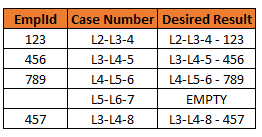
I think the issue is after the last condition then. Switch has a default if no conditions are true, e.g.
SWITCH(TRUE()
,Test, Result
,Test, Result
,Default)
Change your code to the following:
SWITCH (
TRUE (),
'Table'[EmplId] = BLANK (), BLANK (),
'Table'[IssueSub Formatted] = BLANK (), BLANK (),
'Table'[City] = "Not Applicable", BLANK (),
'Table'[City] = "Not Disclosed", BLANK (),
'Table'[IssueSub Formatted] = "Referral/Redirect", BLANK (),
'Table'[Title Categorized] = "Former Employee", BLANK (),
'Table'[EmplId] <> BLANK ()
,COMBINEVALUES (" - ", [CaseNumber], [EmplId]))
Let me know if that fixed it. I removed the =TRUE()
Why a SWITCH if you only have one condition?
IF(ISBLANK(EmpLid), BLANK(), COMBINEVALUES("-",'Table'[EmplId],'Table'[CaseNumber]))
I have at least 5 other conditions, I just shortened it for the sake of the question, thought I'd be able to apply the solution across the entire syntax
I think the issue is after the last condition then. Switch has a default if no conditions are true, e.g.
SWITCH(TRUE()
,Test, Result
,Test, Result
,Default)
Change your code to the following:
SWITCH (
TRUE (),
'Table'[EmplId] = BLANK (), BLANK (),
'Table'[IssueSub Formatted] = BLANK (), BLANK (),
'Table'[City] = "Not Applicable", BLANK (),
'Table'[City] = "Not Disclosed", BLANK (),
'Table'[IssueSub Formatted] = "Referral/Redirect", BLANK (),
'Table'[Title Categorized] = "Former Employee", BLANK (),
'Table'[EmplId] <> BLANK ()
,COMBINEVALUES (" - ", [CaseNumber], [EmplId]))
Let me know if that fixed it. I removed the =TRUE()
Thank you!
The Power BI Data Visualization World Championships is back! Get ahead of the game and start preparing now!
| User | Count |
|---|---|
| 40 | |
| 37 | |
| 33 | |
| 29 | |
| 27 |
| User | Count |
|---|---|
| 134 | |
| 104 | |
| 63 | |
| 60 | |
| 55 |