cancel
Showing results for 
Search instead for 
Did you mean: 

The Power BI Data Visualization World Championships is back! Get ahead of the game and start preparing now! Learn more

Reply
damit23183
Microsoft Employee
Microsoft Employee

SWITCH / CASE statement not working

So here is detail,


Table 1:


Enhance -- Column Name

4773


Table 2:

Sustain -- Column name

446


Table3:

ETE TAT -- Column Name 

1


Now, Current Output table is like below; (As you can see Score column is empty)


Name                 Score

USA

UK

Canada


Now i would like to apply CASE statement (T-SQL) here by using SWITCH or any other function;


Final OUTPUT Table should be like below;


Name            Score

USA                4773

UK                  446

Canada           1


I am getting like this after applying SWITCH function;


Name            Score

USA                1241

UK                  

Canada           1


What i found out is from Table1: First row is coming not total becuase when i pull one category and Enhance fields into TABLIX format the table look like;


Category                    Enhance

Null                               1241

WWC                              30

REC                                123 and so on.....i feel like its only fetching first row not total.


Thanks

1 ACCEPTED SOLUTION

Hi @damit23183 ,


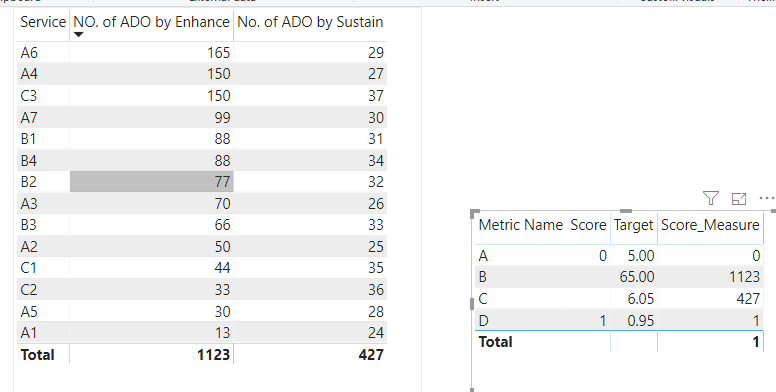
First you need to create two measures to calculate the sum of "enhance" and "sustain",

sum_enhance = CALCULATE(
SUM(SERVICE[NO. of ADO by Enhance]),ALL(SERVICE))
 
sum_sustain = CALCULATE(
SUM(SERVICE[No. of ADO by Sustain]),
ALL(SERVICE))
 

then use the "switch" function to create a new measure and drag it into the table

Score_Measure = SWITCH(MAX(Metric[Metric Name]),"A",MAX(Metric[Score]),"B",[sum_enhance],"C",[sum_sustain],"D",MAX(Metric[Score]))
 
test_switch.PNG
 
You can refer to the pbix.


Best Regards,
Liang
If this post helps, then please consider Accept it as the solution to help the other members find it more quickly.

View solution in original post

4 REPLIES 4
amitchandak
Super User
Super User

I do not think this the complete info. But assume table 4 has a country name, you can do like

Score = if(table4[Name] ="USA" , maxx(Table 1,Table 1[Enhance]), if(table4[Name] ="UK",maxx(Table 2,Table 2[Sustain]),
	maxx(Table 2,Table 2[ETE TAT])))

Switch true, you can also use it.


Appreciate your Kudos. In case, this is the solution you are looking for, mark it as the Solution.
In case it does not help, please provide additional information and mark me with @

Thanks. My Recent Blogs -Decoding Direct Query - Time Intelligence, Winner Coloring on MAP, HR Analytics, Power BI Working with Non-Standard TimeAnd Comparing Data Across Date Ranges
Connect on Linkedin


Share with Power BI Enthusiasts: Full Power BI Video (20 Hours) YouTube
Microsoft Fabric Series 60+ Videos YouTube
Microsoft Fabric Hindi End to End YouTube


Hi,

This is orginal table where score has calcualted for Enhance and Sustain which you can see in highlighted below;


Original Score.JPG

Now, after Case statement i would have these result 3576 and 447 in line of highlighted KPI name below;

Output table.JPG


After applying SWITCH i am not getting anything here, also please one note here there is no relationship between these two tables. 

Therefore, only with CASE statement i can pull the value here.


Hope this will be enough information.

Thanks in Advance!

Thanks

Hi @damit23183 ,


First you need to create two measures to calculate the sum of "enhance" and "sustain",

sum_enhance = CALCULATE(
SUM(SERVICE[NO. of ADO by Enhance]),ALL(SERVICE))
 
sum_sustain = CALCULATE(
SUM(SERVICE[No. of ADO by Sustain]),
ALL(SERVICE))
 

then use the "switch" function to create a new measure and drag it into the table

Score_Measure = SWITCH(MAX(Metric[Metric Name]),"A",MAX(Metric[Score]),"B",[sum_enhance],"C",[sum_sustain],"D",MAX(Metric[Score]))
 
test_switch.PNG
 
You can refer to the pbix.


Best Regards,
Liang
If this post helps, then please consider Accept it as the solution to help the other members find it more quickly.

Hi,


THank you for your response and it worked great.


However, have another question on how to find count, sum, average by category. 

I.e Count (ID) by Service only. Just like doint Count by Group in SQL.

i would like to do Average, Sum and Count by Category in PowerBI Desktop.


Thanks

Helpful resources

Announcements
Power BI DataViz World Championships

Power BI Dataviz World Championships

The Power BI Data Visualization World Championships is back! Get ahead of the game and start preparing now!

December 2025 Power BI Update Carousel

Power BI Monthly Update - December 2025

Check out the December 2025 Power BI Holiday Recap!

FabCon Atlanta 2026 carousel

FabCon Atlanta 2026

Join us at FabCon Atlanta, March 16-20, for the ultimate Fabric, Power BI, AI and SQL community-led event. Save $200 with code FABCOMM.

Top Solution Authors