Join us at FabCon Atlanta from March 16 - 20, 2026, for the ultimate Fabric, Power BI, AI and SQL community-led event. Save $200 with code FABCOMM.
Register now!The Power BI Data Visualization World Championships is back! Get ahead of the game and start preparing now! Learn more
Hello,
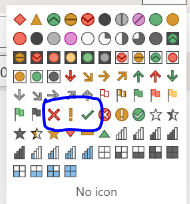
I wish to obtain the SVG code / coordinates for the green check mark, red X, and yellow exclamation point in the conditional formatting icons:
I want to redraw these three icons in different colors.
Does anybody know where the source can be obtained for the outline of these icons? Does Microsoft provide this information?
Regards,
David.
Solved! Go to Solution.
@Anonymous , I think unichar with conditional formatting
UNICHAR - Tool for Custom Icon Formatting: https://www.youtube.com/watch?v=veCtfP8IhbI&list=PLPaNVDMhUXGaaqV92SBD5X2hk3TMNlHhb&index=50
https://exceleratorbi.com.au/conditional-formatting-using-icons-in-power-bi/
https://community.powerbi.com/t5/Desktop/FORMAT-icon-set-for-use-in-a-data-card/td-p/811692
https://exceleratorbi.com.au/dax-unichar-function-power-bi/
Thank you @amitchandak , that was the solution I was looking for. I was unfamiliar with the use of unichar characters in PBI. It was very helpful to learn about.
@Anonymous , I think unichar with conditional formatting
UNICHAR - Tool for Custom Icon Formatting: https://www.youtube.com/watch?v=veCtfP8IhbI&list=PLPaNVDMhUXGaaqV92SBD5X2hk3TMNlHhb&index=50
https://exceleratorbi.com.au/conditional-formatting-using-icons-in-power-bi/
https://community.powerbi.com/t5/Desktop/FORMAT-icon-set-for-use-in-a-data-card/td-p/811692
https://exceleratorbi.com.au/dax-unichar-function-power-bi/
Thanks again @amitchandak ; I tried to give kudos, but it does not seem to allow me to. I am very new on this site.
The Power BI Data Visualization World Championships is back! Get ahead of the game and start preparing now!
| User | Count |
|---|---|
| 37 | |
| 36 | |
| 32 | |
| 31 | |
| 29 |
| User | Count |
|---|---|
| 132 | |
| 86 | |
| 85 | |
| 68 | |
| 64 |