cancel
Showing results for 
Search instead for 
Did you mean: 

View all the Fabric Data Days sessions on demand. View schedule

Reply
sjehanzeb
Resolver I
Resolver I

SUMX for aging data not working

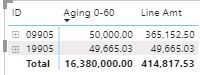
I have created an aging formula for an education institution. the aging is calculating correctly. though the total figures are incorrect
there are three tables in use, the main Date table (sf), a calender table (calender) and mapping table for main data table (mapping).


Capture.JPG


Aging 0-60 = 
var agingto=0
var agingfrom=60
var totatoutstanding=sum(SF[Line Amt])
var maxdate = LASTDATE(Calender[Date])
var positivevalues = CALCULATE(sum(SF[Line Amt]), FILTER(sf, SF[Itm Eff Dt_6]>DATEADD(maxdate, -agingfrom, DAY) && SF[Itm Eff Dt_6]<=DATEADD(maxdate, -agingto, DAY)), Mapping[Transaction ]="Fee - Adjustable" || Mapping[Transaction ]="tax" || Mapping[Transaction ]="Fee", SF[Line Amt]>0)
var previousaging=0
var result = MIN(SUM(SF[Line Amt])-previousaging, positivevalues)
return
if(HASONEFILTER(SF[ID]), 
if (result=0, BLANK(), result), sumX(sf, result))


1 ACCEPTED SOLUTION
mahoneypat
Microsoft Employee
Microsoft Employee

Please try this expression.  Replace Table with your actual table name and use this measure in place of your current one (which it references).


NewMeasure = SUMX(VALUES(Table[ID]), [Aging 0-60])


Regards,

Pat


Did I answer your question? Mark my post as a solution! Kudos are also appreciated!

To learn more about Power BI, follow me on Twitter or subscribe on YouTube.


@mahoneypa HoosierBI on YouTube


View solution in original post

2 REPLIES 2
sjehanzeb
Resolver I
Resolver I

Thanks. Your solution worked. 
though can you explain why it needed to reference it again and can I resolve this using one measure

mahoneypat
Microsoft Employee
Microsoft Employee

Please try this expression.  Replace Table with your actual table name and use this measure in place of your current one (which it references).


NewMeasure = SUMX(VALUES(Table[ID]), [Aging 0-60])


Regards,

Pat


Did I answer your question? Mark my post as a solution! Kudos are also appreciated!

To learn more about Power BI, follow me on Twitter or subscribe on YouTube.


@mahoneypa HoosierBI on YouTube


Helpful resources

Announcements
November Power BI Update Carousel

Power BI Monthly Update - November 2025

Check out the November 2025 Power BI update to learn about new features.

Fabric Data Days Carousel

Fabric Data Days

Advance your Data & AI career with 50 days of live learning, contests, hands-on challenges, study groups & certifications and more!

FabCon Atlanta 2026 carousel

FabCon Atlanta 2026

Join us at FabCon Atlanta, March 16-20, for the ultimate Fabric, Power BI, AI and SQL community-led event. Save $200 with code FABCOMM.

Top Solution Authors
Top Kudoed Authors